Security & IAM

Security & IAM Interview Guide

IAM policies, encryption, WAF, GuardDuty, and Zero Trust β€” security is in every SA question.

6Topics
6Diagrams
AWS Security and IAM Enterprise Architecture Diagram
Security & IAM β€” Enterprise Architecture Overview
Intermediate

IAM Policies & Roles
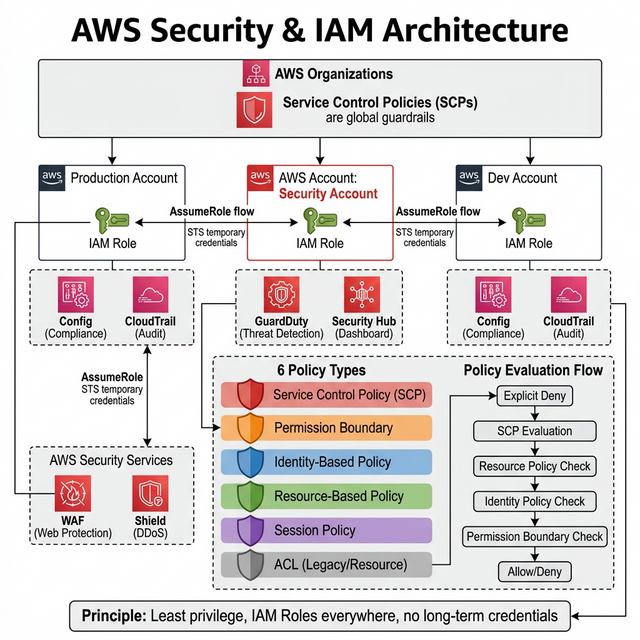
IAM Policies and Roles Architecture Diagram

IAM is the backbone of AWS security. Every action in AWS is an API call that IAM evaluates:

Policy Types (Know All 6)

Policy Type Attached To Use Case Priority
Identity-Based Users, Groups, Roles Grant permissions to principals Standard
Resource-Based S3 buckets, SQS, KMS keys Cross-account access without assuming role Standard
Permission Boundary Users, Roles Maximum permissions a role CAN have (ceiling) Restricts other policies
SCP (Org-level) AWS Organization OU/Account Guardrails across ALL accounts (e.g., deny regions) Overrides everything
Session Policy STS AssumeRole sessions Limit permissions for a specific session Restricts role
ACL (Access Control List) S3, VPC Legacy cross-account (avoid β€” use bucket policies) Legacy

IAM Policy Evaluation Logic

  1. Explicit Deny? β†’ DENY (always wins, cannot be overridden)
  2. SCP allows? β†’ If no, DENY
  3. Resource-based policy allows? β†’ If yes, ALLOW
  4. Identity-based policy allows? β†’ If yes, check Permissions Boundary
  5. Permission Boundary allows? β†’ If yes, ALLOW
  6. Nothing matches? β†’ DENY (implicit deny)

Roles vs Users β€” The Rule

Never use long-term credentials (access keys). Use IAM Roles everywhere: EC2 instance profiles, ECS task roles, Lambda execution roles, cross-account roles. Only use IAM users for CLI access by humans, with MFA enforced.

🎯 Key Takeaway

Interview tip: "I follow least-privilege: start with zero permissions, add only what's needed. I use IAM Roles (not users) for all services, SCPs as guardrails at the org level, and Permission Boundaries to limit what developers can create. Explicit deny always wins in policy evaluation."
Advanced

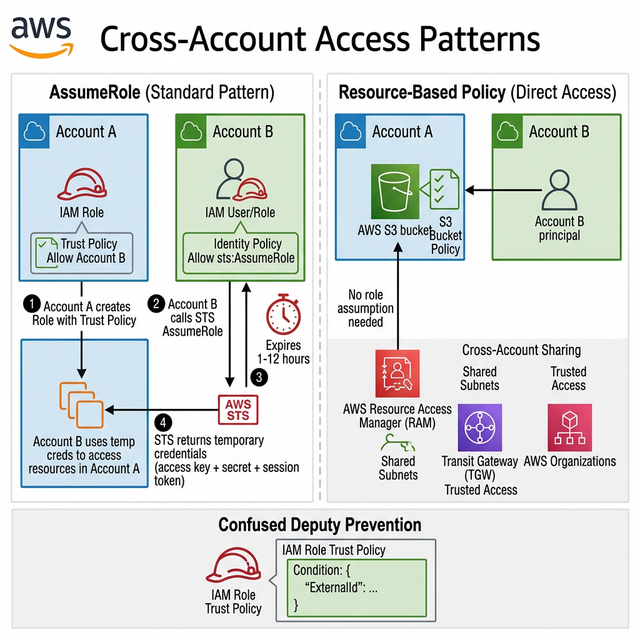
Cross-Account Access Patterns

Cross-Account Access Patterns Diagram

Cross-account access is fundamental in multi-account AWS environments:

Pattern How It Works Best For
AssumeRole Account A's role trusts Account B β†’ B assumes role in A via STS Standard cross-account access (most common)
Resource-Based Policy S3 bucket policy grants access to Account B's principal directly S3, SQS, KMS, Lambda β€” no role assumption needed
AWS RAM Share resources (subnets, Transit Gateways) across accounts Shared networking, shared databases
AWS Organizations Trusted access for org-level services (CloudTrail, Config) Centralized security, logging, compliance

AssumeRole Flow (Know This Cold)

  1. Account A creates role with trust policy: "Account B can assume this role"
  2. Account B has identity policy allowing sts:AssumeRole on Account A's role ARN
  3. Account B calls STS AssumeRole β†’ receives temporary credentials (access key, secret key, session token)
  4. Temporary creds expire in 1-12 hours (configurable) β€” no long-term keys

Confused Deputy Problem

When a third-party service assumes your role, another customer could potentially trick it into accessing your resources. Solution: Use ExternalId condition in the trust policy β€” a shared secret between you and the third party.

🎯 Key Takeaway

Interview tip: "For cross-account, I use AssumeRole with temporary credentials β€” never share access keys. For S3 specifically, resource-based policies work without role assumption. For shared infrastructure (VPC subnets, Transit Gateway), AWS RAM avoids duplication. I always use ExternalId for third-party integrations to prevent confused deputy attacks."

Intermediate

Encryption & KMS

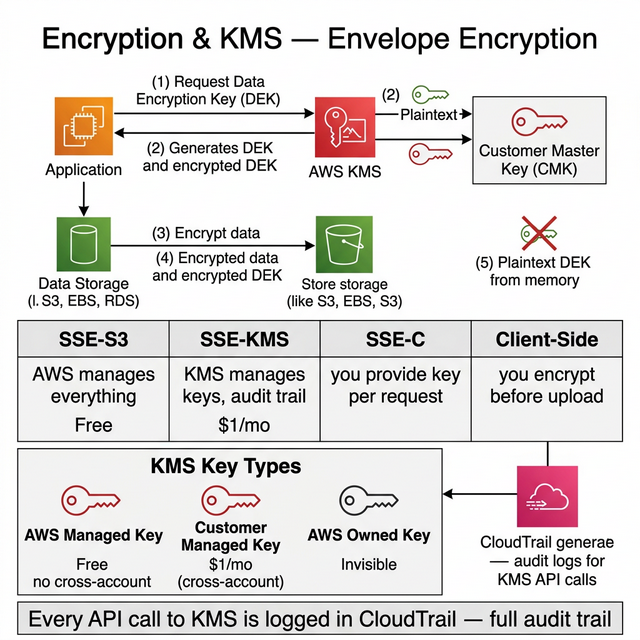
Encryption and KMS Envelope Encryption Diagram

Encryption is not optional β€” it's a requirement. Know the differences:

Aspect SSE-S3 SSE-KMS SSE-C Client-Side
Key Management AWS manages everything AWS KMS manages keys You provide key per request You encrypt before upload
Key Visibility No visibility Full audit trail in CloudTrail You manage key lifecycle Full control
Rotation Automatic Automatic (yearly) or manual You rotate manually You rotate
Cross-Account ❌ βœ… Via key policy βœ… You share keys βœ… You share keys
Cost Free $1/month/key + $0.03/10K requests Free (you manage keys) Free (you manage)
Use Case Default, no compliance needs Compliance, audit, cross-account Regulatory (you must hold keys) Most restrictive compliance

KMS Key Types

  • AWS Managed Key (aws/s3, aws/ebs) β€” AWS creates, manages. Free. No cross-account.
  • Customer Managed Key (CMK) β€” You create, control policy. $1/month. Cross-account βœ…. Recommended for production.
  • AWS Owned Key β€” Used internally by AWS services. You can't see or manage them.

Envelope Encryption (Know This!)

KMS uses envelope encryption: KMS generates a Data Encryption Key (DEK) β†’ DEK encrypts your data β†’ KMS encrypts the DEK with your CMK β†’ Store encrypted DEK alongside encrypted data. This avoids sending all your data to KMS (which has a 4KB limit per API call).

🎯 Key Takeaway

Interview tip: "I use SSE-KMS with Customer Managed Keys for production β€” gives me audit trails in CloudTrail, automatic rotation, and cross-account sharing via key policies. For data at rest: KMS everywhere (S3, EBS, RDS, DynamoDB). For data in transit: TLS 1.2+ enforced via ALB/CloudFront with ACM certificates."

Intermediate

WAF, Shield & DDoS Protection

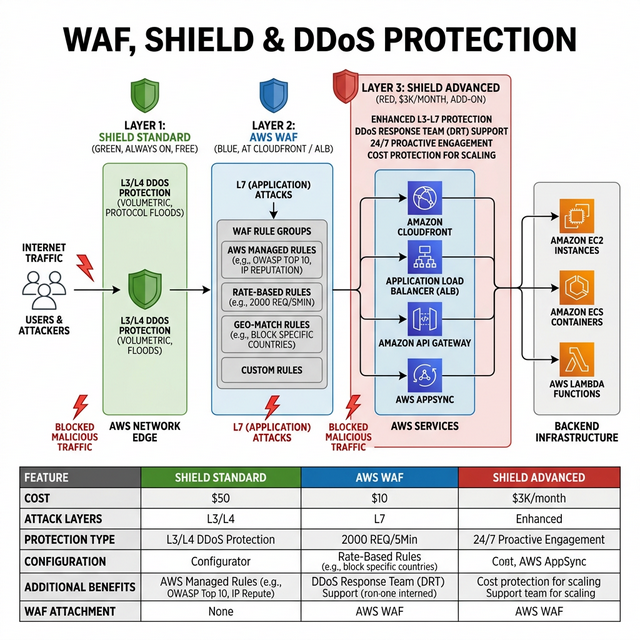
WAF Shield DDoS Protection Diagram
Service Protects Against Attached To Cost
AWS WAF SQL injection, XSS, bot attacks, rate limiting (L7) CloudFront, ALB, API Gateway, AppSync $5/month/web ACL + $1/rule + $0.60/million requests
Shield Standard Common DDoS attacks (L3/L4) All AWS resources automatically βœ… Free (always on)
Shield Advanced Sophisticated DDoS + DRT team + cost protection EC2, ELB, CloudFront, Route 53, Global Accelerator $3,000/month + data transfer

WAF Rule Groups (Quick Reference)

  • AWS Managed Rules β€” Pre-built: OWASP Top 10, SQL injection, Known Bad Inputs, Bot Control, IP Reputation
  • Rate-Based Rules β€” Block IPs exceeding threshold (e.g., 2000 requests/5 minutes)
  • Geo-Match β€” Block/allow traffic from specific countries
  • Custom Rules β€” Match on headers, URI path, query string, body content

🎯 Key Takeaway

Interview tip: "Shield Standard is free and always on β€” protects against L3/L4 DDoS. WAF protects at L7 β€” I attach it to CloudFront and ALB with AWS Managed Rules for OWASP Top 10, plus rate-based rules. Shield Advanced is for enterprises with $3K/month budget β€” gives you the AWS DDoS Response Team and cost protection."

Intermediate

GuardDuty, Config & Security Hub

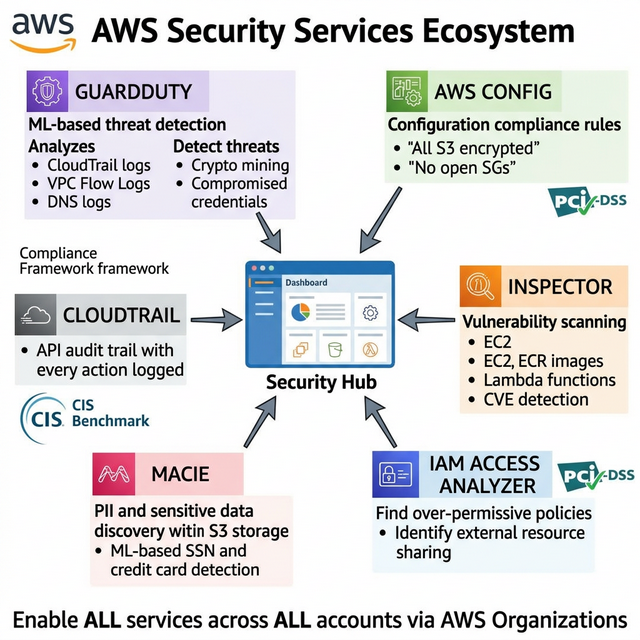
AWS Security Services Ecosystem Diagram

Know the security service landscape β€” interviewers test whether you know which tool does what:

Service What It Does Data Sources Key Capability
GuardDuty Threat detection (ML-based) CloudTrail, VPC Flow Logs, DNS logs, S3 data events Detects crypto mining, compromised credentials, C2 communication
AWS Config Configuration compliance Resource configuration history Rules: "All S3 buckets must be encrypted", "All SGs must not allow 0.0.0.0/0 inbound"
Security Hub Central security dashboard Aggregates GuardDuty, Config, Inspector, IAM Analyzer Single pane of glass + automated compliance checks (CIS, PCI-DSS)
Inspector Vulnerability scanning EC2, ECR container images, Lambda CVE detection, network reachability analysis
IAM Access Analyzer Find over-permissive policies IAM policies, S3 bucket policies, KMS policies Detects resources shared with external accounts
Macie PII/sensitive data discovery S3 buckets ML-based detection of credit cards, SSNs, PHI in S3

Enterprise Security Architecture

Enable in ALL accounts: GuardDuty β†’ detects threats. Config β†’ enforces compliance. Security Hub β†’ aggregates findings. CloudTrail β†’ audit trail. All findings flow to a central Security account for the security team to triage.

🎯 Key Takeaway

Interview tip: "I enable GuardDuty across all accounts for threat detection, Config for compliance rules, and Security Hub as the single dashboard. GuardDuty finds compromised instances, Config catches misconfigurations like open security groups, and Security Hub gives the security team one view across all accounts with CIS benchmark scoring."

Advanced

Zero Trust Architecture on AWS

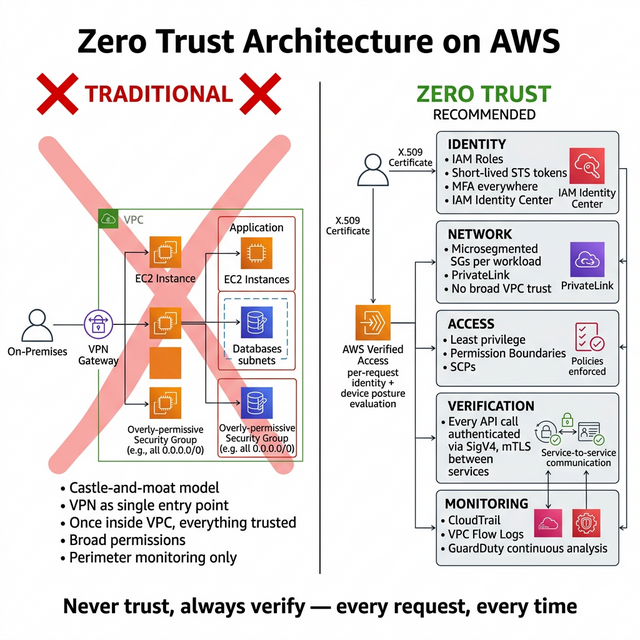
Zero Trust Architecture on AWS Diagram

Zero Trust means "never trust, always verify" β€” every request is authenticated and authorized regardless of network location:

Principle Traditional Zero Trust on AWS
Network Trust inside VPC/VPN Microsegmentation via SGs per workload, PrivateLink
Identity Once authenticated, trusted Short-lived tokens (STS), MFA everywhere, just-in-time access
Access Broad permissions Least privilege, Permission Boundaries, SCPs
Verification Perimeter-based Every API call verified: mTLS, signed requests (SigV4)
Monitoring Perimeter monitoring Every action logged: CloudTrail, VPC Flow Logs, GuardDuty

AWS Zero Trust Services

  • AWS Verified Access β€” Zero-trust access to corporate apps without VPN. Evaluates identity + device posture per request.
  • IAM Roles Anywhere β€” Extend IAM roles to on-premises servers using X.509 certificates. No access keys needed.
  • AWS SSO (IAM Identity Center) β€” Centralized access management. Short-lived credentials. One identity across all accounts.

🎯 Key Takeaway

Interview tip: "Zero Trust on AWS means: IAM Roles everywhere (no long-term keys), microsegmented SGs (not broad VPC trust), mTLS between services, short-lived session tokens via STS, and continuous verification via GuardDuty and Config. AWS Verified Access replaces traditional VPN with per-request identity + device verification."

Advanced

Interview Questions β€” Security & IAM

Security is tested in every architect interview. These questions cover IAM, encryption, incident response, and governance scenarios.

  1. Answer Guide
    SCPs are evaluated first and act as a guardrail. Even if the identity policy allows it, the SCP deny wins. The evaluation order is: SCP β†’ Resource policy β†’ Permission boundary β†’ Identity policy.
  2. Answer Guide
    IAM Role with trust policy + ExternalId condition. The ExternalId prevents confused deputy attacks where another customer could assume the role. Never use long-term access keys.
  3. Answer Guide
    Secrets Manager for automatic rotation and cross-account sharing. Parameter Store (SecureString) for simpler secrets without rotation. Never plaintext env vars β€” they appear in console and logs.
  4. Answer Guide
    Isolate (change SG to deny all), preserve (snapshot EBS for forensics), investigate (VPC Flow Logs, CloudTrail, GuardDuty findings), remediate (terminate instance, rotate all credentials on it), post-mortem.
  5. Answer Guide
    KMS CMKs with automatic rotation (now configurable 90-2560 days). Envelope encryption for large data. TLS 1.2+ enforced via security policies. Discuss S3 SSE-KMS, RDS encryption, EBS encryption, and ACM for certificates.
  6. Answer Guide
    AWS Organizations with SCPs. Create a deny policy for all regions except the allowed ones. Apply at the OU level. Discuss the "deny all + allow list" vs "allow all + deny list" approach.
  7. Answer Guide
    WAF handles Layer 7 (rate-based rules, IP reputation, SQL injection). Shield Standard (free, Layer 3/4 DDoS). Shield Advanced ($3K/month) adds DRT support, cost protection, and advanced metrics.
  8. Answer Guide
    Immediate: rotate/delete the keys, audit CloudTrail for unauthorized usage. Long-term: use OIDC federation (GitHub Actions β†’ IAM role) instead of keys. Implement permission boundaries and SCP to prevent admin access.
  9. Answer Guide
    Permission boundary sets the maximum permissions a role/user can have. Use case: allow developers to create IAM roles but limit what those roles can do (prevent privilege escalation). Effective permissions = intersection of boundary and identity policy.
  10. Answer Guide
    AWS Verified Access (per-request verification, no VPN), IAM Identity Center for SSO, IAM Roles Anywhere for on-prem workloads, mTLS between services, microsegmented Security Groups, short-lived STS tokens.

Preparation Strategy

Security questions are non-negotiable β€” a wrong answer here can end an interview. Focus on the "why" behind each control: Why IAM roles over users? Why SCPs at the OU level? Why envelope encryption? The reasoning matters more than the implementation.