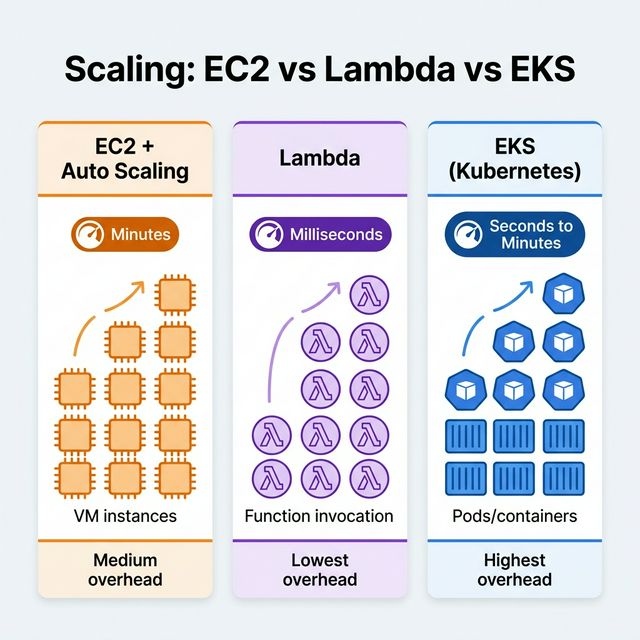
Auto Scaling Group (target tracking, step, scheduled)
Automatic concurrency scaling
HPA (Horizontal Pod Autoscaler), Karpenter/Cluster Autoscaler for nodes
Max Duration
Unlimited
15 minutes
Unlimited
Best For
Long-running, stateful workloads
Short, event-driven, bursty workloads
Containerized microservices at scale
Operational Overhead
Medium (patch, AMI management)
Lowest (fully managed)
Highest (cluster management, networking)
Intermediate
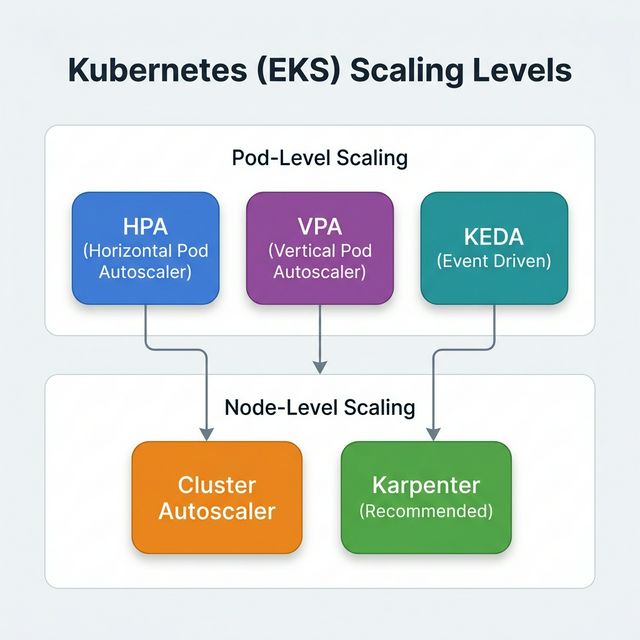
Kubernetes (EKS) Scaling
EKS scaling operates at two levels:
Pod-Level Scaling
Horizontal Pod Autoscaler (HPA) — Adds or removes pod replicas based on CPU,
memory, or custom metrics. Reacts in seconds.
Vertical Pod Autoscaler (VPA) — Adjusts CPU/memory requests and limits for
individual pods. Requires pod restart.
KEDA (Kubernetes Event Driven Autoscaling) — Scales pods based on external event
sources (SQS queue depth, Kafka lag, etc.).
Node-Level Scaling
Cluster Autoscaler — Watches for pods that can't be scheduled due to insufficient
resources, then adds nodes from pre-configured Auto Scaling Groups. Limited to predefined instance
types.
Karpenter — Next-generation node provisioner. Directly provisions the right-sized
EC2 instance for pending pods. No need for pre-configured node groups. Faster, more efficient, and
supports consolidation.
Intermediate
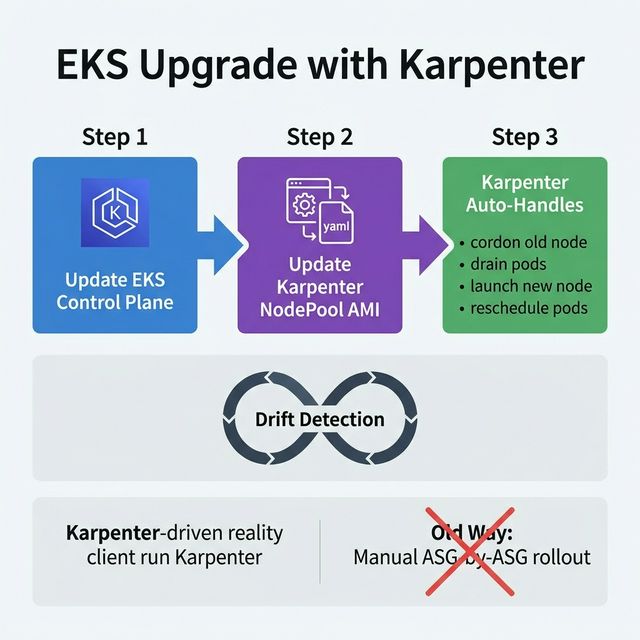
EKS Upgrade With Karpenter
Karpenter simplifies EKS upgrades by managing node lifecycle automatically:
Update the EKS control plane — Upgrade the Kubernetes version of the EKS cluster
(managed by AWS).
Update the Karpenter NodePool AMI — Change the amiFamily or AMI
selector in the Karpenter NodePool spec to point to the new Kubernetes version AMI.
Karpenter handles the rest — Karpenter detects nodes running outdated AMIs and uses
its drift detection feature. It automatically cordons old nodes, gracefully drains
pods, launches new nodes with the updated AMI, and schedules pods onto them.
Key advantage over Cluster Autoscaler: No need to manually manage multiple managed
node groups, roll out updates ASG-by-ASG, or deal with PodDisruptionBudgets manually. Karpenter handles
disruption budgets, pod rescheduling, and node replacement in one workflow.
Advanced
EKS Upgrade With Karpenter - Advanced
Disruption Controls
Consolidation — Karpenter continuously watches for underutilized nodes. It deletes
or replaces nodes when pods can be rescheduled on fewer/smaller instances, reducing cost.
Expiration (TTL) — Set expireAfter on NodePool to force node recycling
after a time period, ensuring nodes stay fresh and up-to-date.
Drift Detection — Karpenter detects when a node's configuration no longer matches
the NodePool spec (AMI, instance type, labels) and replaces it.
NodePool Configuration
Multiple NodePools — Create separate NodePools for different workload types (e.g.,
GPU workloads, spot-tolerant batch jobs, on-demand critical services).
Instance Type Flexibility — Specify broad requirements (CPU, memory, architecture)
and let Karpenter choose the cheapest matching instance.
Spot & On-Demand Mix — Use capacityType to mix Spot and On-Demand
within the same NodePool with weighted priorities.
Beginner
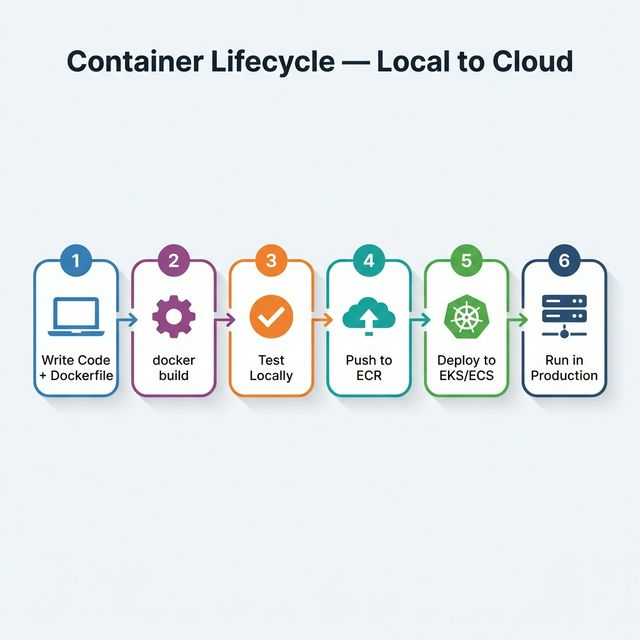
Container Lifecycle - Local to Cloud
The journey of a containerized application from a developer's laptop to production in the cloud:
Write Code + Dockerfile — Developer writes application code and a Dockerfile that
defines the runtime environment, dependencies, and startup command.
Build Container Image — Run docker build locally to create a container
image from the Dockerfile.
Test Locally — Run docker run to test the container on the local
machine. Verify the application works as expected.
Push to Registry — Push the image to Amazon ECR (Elastic Container
Registry) so it's available in the cloud.
Deploy to Orchestrator — Deploy the container image to Amazon EKS
(Kubernetes), ECS (Elastic Container Service), or Fargate
(serverless containers) using manifest YAMLs or task definitions.
Run in Production — The orchestrator manages scheduling, scaling, health checks,
rolling updates, and self-healing across multiple nodes and AZs.
Beginner
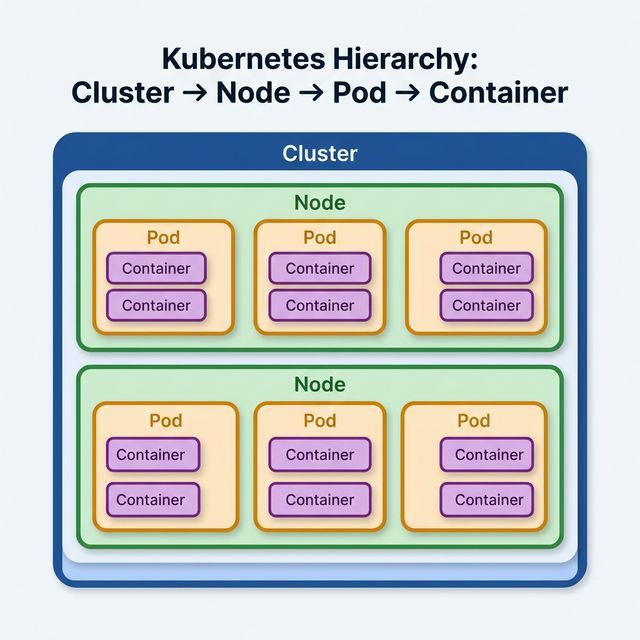
Kubernetes Node Pod Container Relationship
Understanding the hierarchy in Kubernetes:
Cluster — The top-level unit. A cluster is a set of nodes managed by the Kubernetes
control plane.
Node — A worker machine (EC2 instance in EKS). Nodes provide compute resources
(CPU, memory) for running pods.
Pod — The smallest deployable unit in Kubernetes. A pod wraps one or more
containers that share the same network namespace (IP address) and storage volumes.
Container — The actual running application process. A container runs from a
container image (e.g., from ECR).
Key Relationships
One Node runs many Pods
One Pod typically runs one Container (but can run multiple — see
sidecar pattern)
All containers in a pod share the same IP address, ports, and volumes
Pods are ephemeral — they can be killed and rescheduled on different nodes at any time
Intermediate
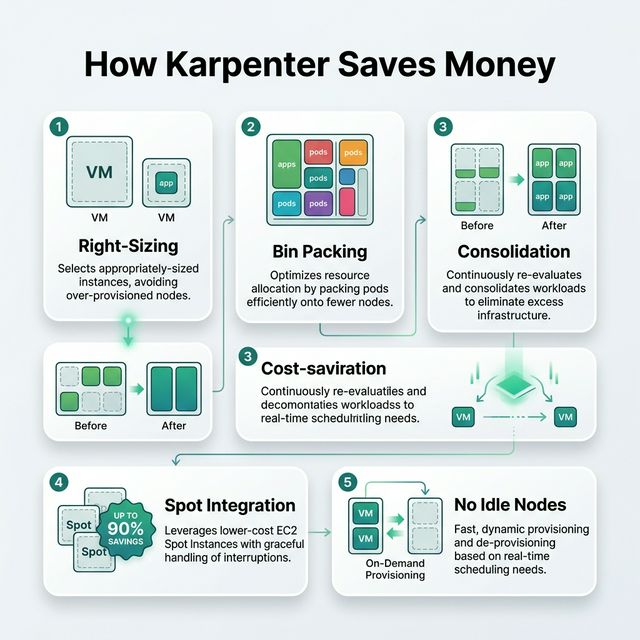
How Karpenter Saves Money
Karpenter reduces costs through intelligent node provisioning and continuous optimization:
Right-Sizing — Karpenter selects the optimal EC2 instance type for the pending
pod's resource requirements. Instead of using a pre-configured m5.xlarge for a pod that needs 0.5
vCPU, Karpenter might launch a smaller t3.medium.
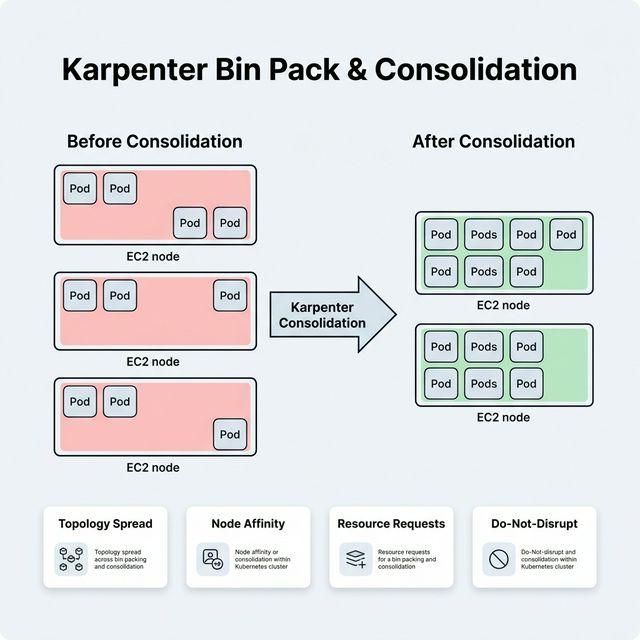
Bin Packing — Karpenter packs pods tightly onto nodes to maximize utilization. Less
wasted CPU/memory per node means fewer nodes needed overall.
Consolidation — Karpenter continuously monitors running nodes. If pods can be
reshuffled onto fewer or cheaper nodes, it automatically migrates them and terminates the excess
nodes.
Spot Instance Integration — Karpenter natively supports Spot instances and can fall
back to On-Demand when Spot capacity is unavailable. Spot can save up to 90% vs On-Demand pricing.
No Idle Node Groups — Unlike Cluster Autoscaler (which requires pre-configured ASGs
that might sit idle), Karpenter provisions nodes on-demand and removes them when empty.
Intermediate
EDA with Kubernetes
Running event-driven architectures on Kubernetes combines the decoupling benefits of EDA with the
orchestration power of K8s:
KEDA (Kubernetes Event Driven Autoscaler) — Scales consumer pods to zero when there
are no messages, and scales up based on queue depth or event lag. Prevents idle resource costs.
Consumer Pods — Long-running pods that poll SQS, subscribe to SNS, or consume from
Kafka topics. Each pod processes events independently.
DLQ (Dead Letter Queue) — Messages that fail processing after max retries are sent
to a DLQ for investigation and replay.
Why Kubernetes for EDA?
Scale consumer pods independently per event type
Use different resource profiles for different event processors
Built-in health checks and self-healing for consumer reliability
Advanced
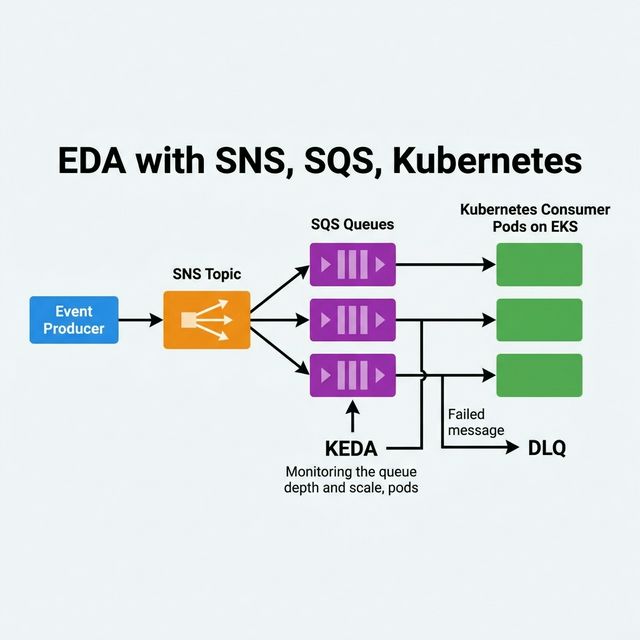
EDA with SNS, SQS, Kubernetes
A common event-driven pattern combining AWS messaging with Kubernetes consumers:
Architecture Flow
Producer publishes events to an SNS Topic.
SNS fans out to multiple SQS Queues (one per consumer type), with
message filtering to route events to the right queue.
Kubernetes pods on EKS poll their respective SQS queues and process messages.
KEDA monitors each SQS queue's ApproximateNumberOfMessages and scales
the consumer pods accordingly — scaling to zero when the queue is empty.
Why SNS + SQS (not just SQS)?
SNS provides fan-out — one event goes to multiple subscribers
SQS provides buffering — messages are retained even if the consumer is down, with
built-in retry and DLQ
Together they decouple producers from consumers and enable independent scaling
Intermediate
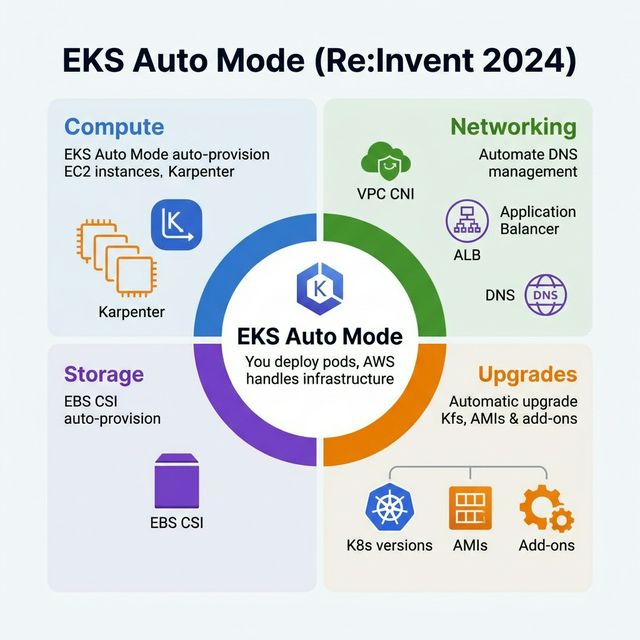
EKS Auto (Re:Invent 2024)
EKS Auto Mode, announced at Re:Invent 2024, is a fully managed experience for Amazon EKS that automates
cluster infrastructure management:
What EKS Auto Manages
Compute — Automatically provisions and right-sizes EC2 instances (powered by
Karpenter). No need to configure node groups or instance types.
Networking — Automatically configures VPC CNI, load balancers, and DNS for
services.
Storage — Automatically provisions EBS volumes via CSI drivers.
Upgrades — Automatically upgrades the Kubernetes version, AMIs, and add-ons with
minimal disruption.
Key Benefit
EKS Auto eliminates the operational burden of managing Kubernetes infrastructure. You focus on
deploying applications; AWS handles the cluster. It's the "serverless experience" for Kubernetes — you
just deploy pods and EKS Auto handles everything underneath.
Beginner
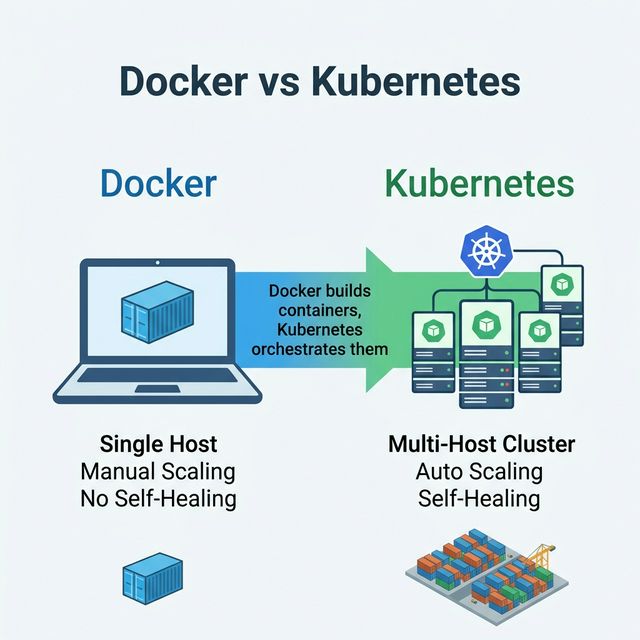
Docker Vs Kubernetes
Docker and Kubernetes solve different problems and work together, not against each other:
Aspect
Docker
Kubernetes
What It Is
Container runtime — builds and runs containers
Container orchestrator — manages containers at scale
Think of it this way: Docker is like a shipping container. Kubernetes is the port that
manages thousands of shipping containers — scheduling, routing, stacking, and replacing them
automatically.
Intermediate
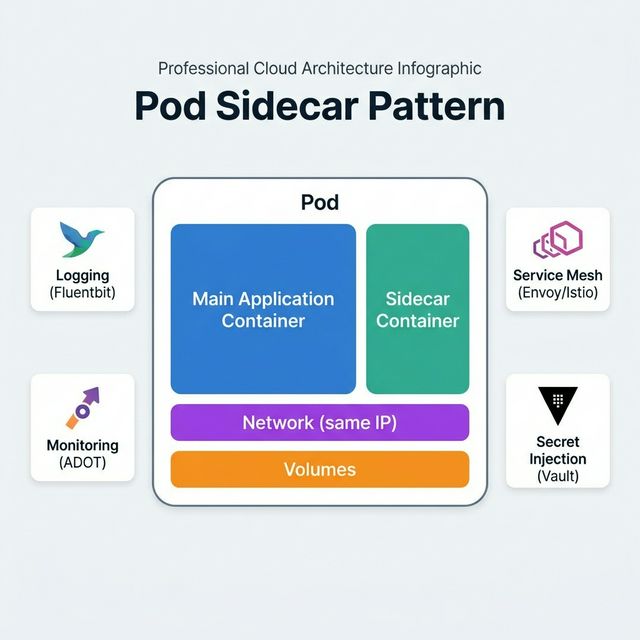
Pod Container Sidecar
The sidecar pattern runs a secondary container alongside the main application container within the same
pod. Both containers share the same network and storage.
Common Sidecar Use Cases
Logging / Log Forwarding — Sidecar container (e.g., Fluentbit) reads log files
written by the main container and ships them to CloudWatch, Elasticsearch, or Splunk.
Service Mesh Proxy — Envoy proxy sidecar (used by Istio, App Mesh) handles mTLS,
traffic routing, retries, and observability without changing application code.
Monitoring Agent — Sidecar collects metrics and traces (e.g., ADOT, Datadog agent)
and exports them to monitoring backends.
Secret Injection — Sidecar fetches secrets from AWS Secrets Manager or Vault and
mounts them as files for the main container.
Why Sidecar Instead of Building It In?
Separation of concerns — Application code stays clean; cross-cutting concerns live
in the sidecar.
Reusability — Same sidecar image works across all microservices.
Independent updates — Update the sidecar without redeploying the main application.
Advanced
Karpenter Bin Pack Granular Control
Karpenter's bin packing decides how tightly pods are packed onto nodes to maximize resource
utilization:
Consolidation Policies
WhenUnderutilized — Karpenter replaces nodes when it detects pods can fit on fewer
or cheaper nodes. Aggressive cost savings but more pod disruption.
WhenEmpty — Karpenter only removes nodes when all pods have been drained (safest,
least disruptive, but less cost-efficient).
Granular Controls
Pod resource requests — Set accurate CPU/memory requests so Karpenter can calculate
true utilization and choose the right instance size.
Topology spread constraints — Force pods to spread across AZs or nodes for high
availability, even if bin packing would prefer a single node.
Node affinity / anti-affinity — Control which pods can or cannot share the same
node.
Do-not-disrupt annotation — Mark critical pods with
karpenter.sh/do-not-disrupt: "true" to prevent Karpenter from evicting them during
consolidation.
Best practice: Set accurate resource requests, use topology constraints for HA, and
let Karpenter handle the rest. Over-requesting resources defeats the purpose of bin packing.
Intermediate
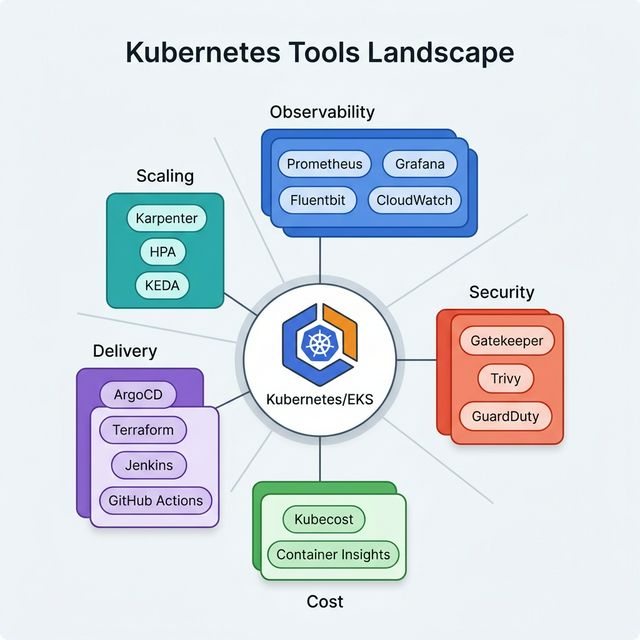
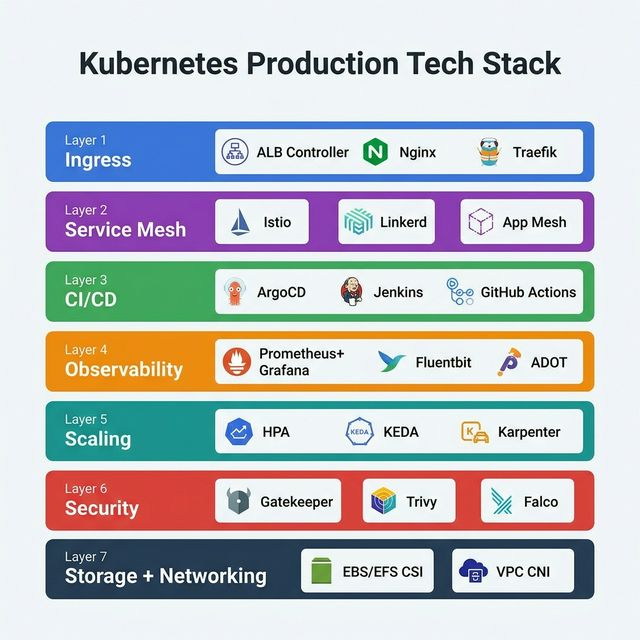
Kubernetes Tech Stack
A typical production-ready Kubernetes tech stack on AWS EKS:
Kubernetes questions go deep on architecture internals, EKS operations, and production-readiness. These cover what interviewers actually ask.
Walk me through what happens when you run kubectl create deployment nginx --image=nginx. Trace the request from kubectl to a running pod.
Answer Guide
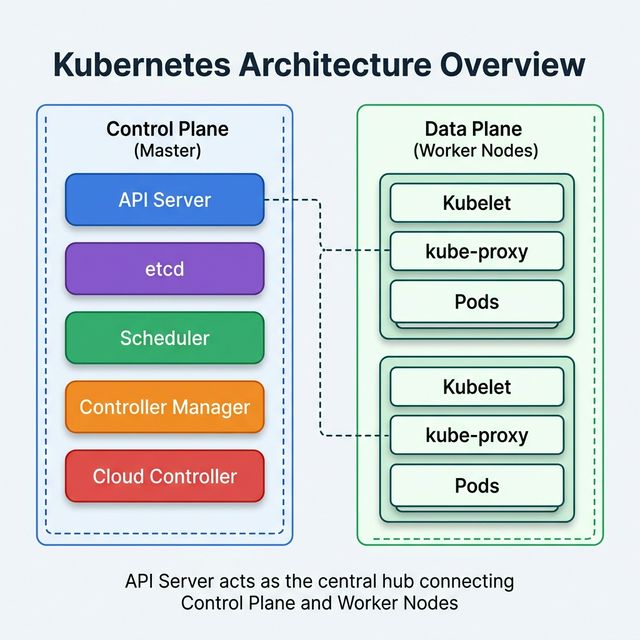
kubectl → API Server (auth/authz/admission) → etcd (store desired state) → Scheduler (picks a node based on resources/affinity) → Kubelet on node (pulls image, creates container via CRI) → Pod running. Discuss the control loop pattern.
Your EKS cluster is running out of pod IP addresses. Pods are stuck in "Pending" with the error "insufficient IPs." What's happening and how do you fix it?
Answer Guide
AWS VPC CNI assigns real VPC IPs to pods. Each instance type has a max ENI × IPs-per-ENI limit. Solutions: enable prefix delegation (16 IPs per slot instead of 1), use larger instance types, add secondary CIDR to VPC, or consider custom networking with separate pod subnets.
Compare Cluster Autoscaler and Karpenter. Why would you choose Karpenter over Cluster Autoscaler for a production EKS cluster?
Answer Guide
Karpenter: group-less (no ASGs), provisions optimal instance type per pod spec, faster scaling (seconds vs minutes), supports consolidation (bin-packing to reduce waste), drift detection for automated upgrades. CA: uses ASGs, requires node groups per instance type, slower scheduling.
Design the RBAC policy for an EKS cluster shared by 3 teams (platform, backend, frontend). Each team should only access their own namespace. Platform team needs cluster-wide access. How do you set it up?
Answer Guide
Create namespaces (platform, backend, frontend). Role + RoleBinding per namespace for team-specific access. ClusterRole + ClusterRoleBinding for platform team. Map IAM roles to K8s groups using aws-auth ConfigMap or EKS access entries. Use IRSA for pod-level AWS permissions.
Explain the difference between ClusterIP, NodePort, LoadBalancer, and Ingress in Kubernetes. When would you use each?
Answer Guide
ClusterIP (internal only), NodePort (exposes on every node's port, testing), LoadBalancer (creates AWS ALB/NLB per service — expensive if many services), Ingress (single ALB with path/host-based routing to multiple services — preferred for production). Discuss AWS ALB Ingress Controller.
A pod keeps crashing with OOMKilled. The developer set resource requests to 256Mi and limits to 512Mi. The application uses 300Mi at startup and 600Mi under load. Walk through the diagnosis and fix.
Answer Guide
The application exceeds the 512Mi limit under load → kernel OOM kills the container. Fix: increase limits to match actual peak usage (e.g., 768Mi). Discuss requests vs limits: requests guarantee scheduling, limits cap usage. VPA can auto-tune these based on actual usage.
Your company wants to run both stateless web services and stateful databases (PostgreSQL) on the same EKS cluster. Is this a good idea? How would you handle persistent storage?
Answer Guide
Stateless services — fine on EKS. Stateful databases — use with caution. PersistentVolumeClaims with EBS CSI driver (gp3), StorageClass for dynamic provisioning. Consider: node affinity for data locality, pod disruption budgets, backup strategies. For critical databases, managed services (RDS) are often better than self-managed on K8s.
How do you implement a zero-downtime deployment for a Kubernetes application that has database schema changes? Walk through the deployment strategy.
Answer Guide
Rolling update with readiness probes. Database: backward-compatible migrations only (add columns, not rename/delete). Deploy new code that handles both old and new schema → migrate schema → remove old-schema code in next release. Discuss blue/green deployments with Argo Rollouts for safer rollbacks.
You need to secure secrets in an EKS cluster. A developer suggests using Kubernetes Secrets. What are the problems with that approach and what alternatives would you recommend?
Answer Guide
K8s Secrets are base64-encoded (not encrypted by default), stored in etcd, visible to anyone with RBAC read on the namespace. Better: AWS Secrets Manager + External Secrets Operator (syncs secrets from AWS to K8s). Enable EKS envelope encryption for etcd. Use IRSA to limit which pods access which secrets.
Describe how you'd set up observability for an EKS cluster in production. What metrics, logs, and traces would you collect? Which tools would you use?
Answer Guide
Metrics: Prometheus + Grafana (or Amazon Managed Prometheus/Grafana). Karpenter and HPA metrics. Logs: Fluent Bit → CloudWatch Logs or OpenSearch. Traces: OpenTelemetry → X-Ray or Jaeger. Key metrics: pod CPU/memory, request latency (p50/p95/p99), error rates, node utilization, pending pods count.
Preparation Strategy
Kubernetes interviews test both conceptual understanding and operational depth. Be ready to explain the control plane architecture, troubleshoot pod scheduling issues, and discuss production concerns (security, observability, upgrades). Hands-on experience with kubectl troubleshooting commands is essential.