Traditional DevOps (Push-based)
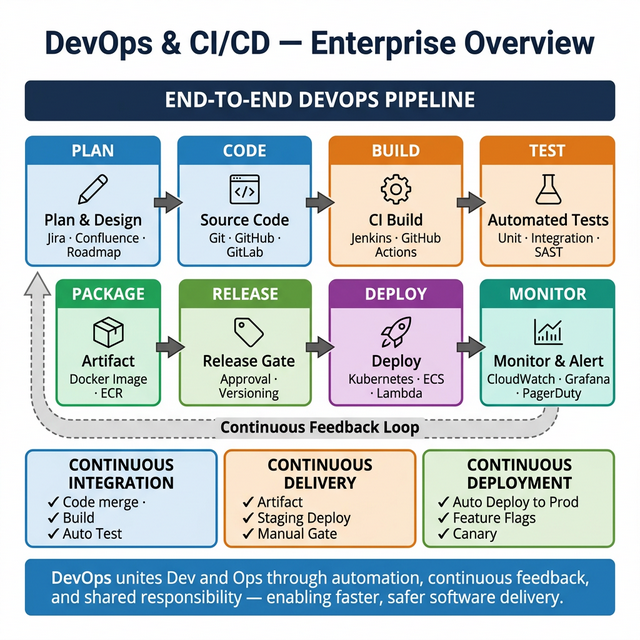
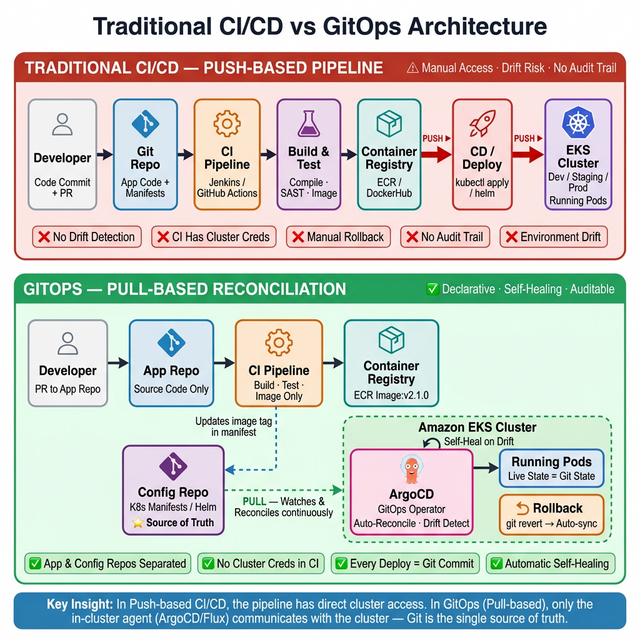
- Developers check in Code, Dockerfile, and manifest YAMLs to an application repository. CI tools
(e.g. Jenkins) build the container image and save it in a container registry such as Amazon ECR.
- CD tools (e.g. Jenkins) update the deployment manifest files with the tag of the container image.
- CD tools execute the command to deploy the manifest files into the cluster, deploying the newly
built container in Amazon EKS.
Conclusion: Traditional CI/CD is a push-based model. If a sneaky SRE changes the
YAML file directly in the cluster, the resources running in the cluster will deviate from what's
defined in Git.
GitOps (Pull-based)
- Developers check in Code, Dockerfile, and manifest YAMLs. CI tools build the container image and
save it in Amazon ECR.
- CD tools update the deployment manifest files with the tag of the container image.
- With GitOps, Git becomes the single source of truth. You install a GitOps tool like Argo inside
the cluster and point to a Git repo. It keeps checking if there is a new file, or if the files in
the cluster drift from the ones in Git. As soon as YAML is updated, ArgoCD detects the drift and
pulls in the updated YAML file to deploy the new container.
Conclusion: GitOps does NOT replace DevOps — it only replaces part of the CD
process. If the sneaky SRE directly changes the YAML in the cluster, ArgoCD will detect the mismatch,
pull in the file from Git, and bring Kubernetes resources to its intended state.