IP vs URL, what happens when you type a URL, and core concepts.
2Topics
IP Address vs URL — core concepts for interviews
Beginner
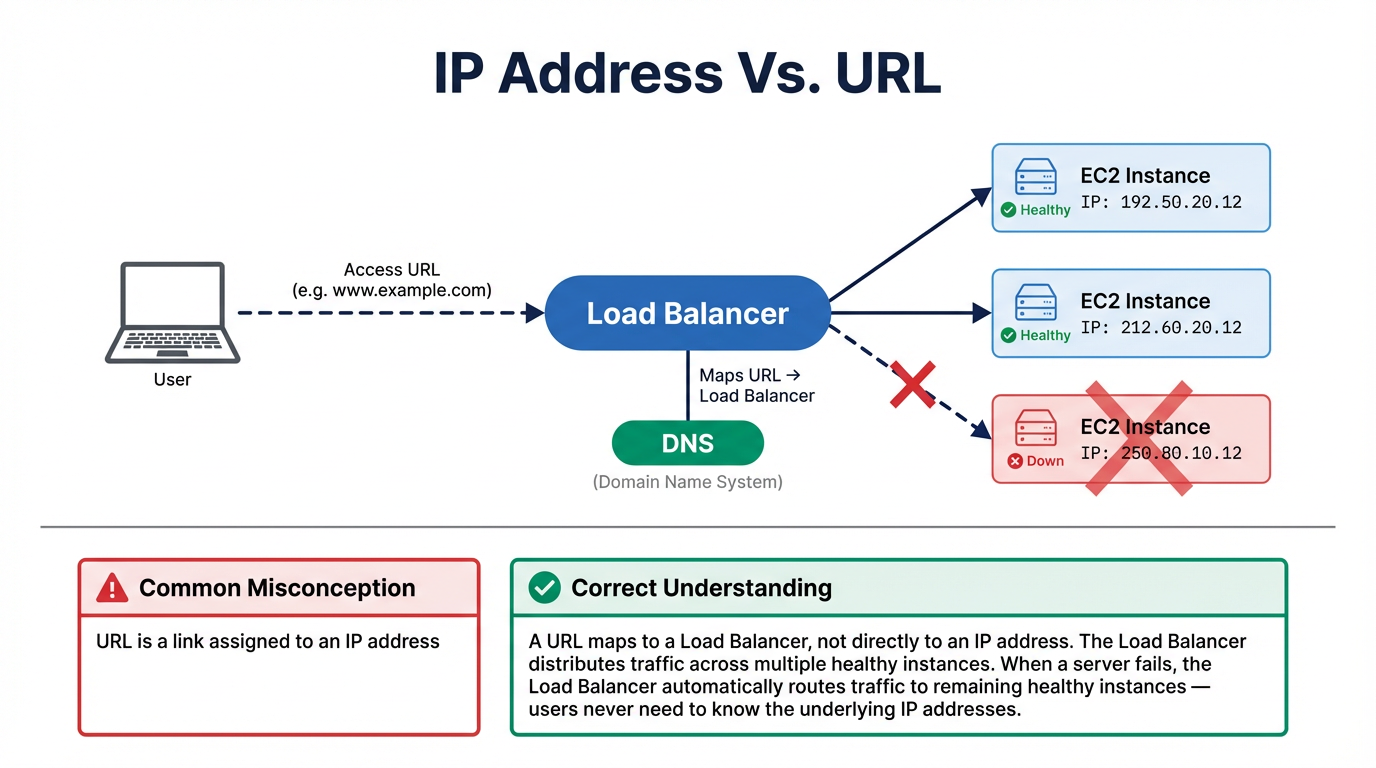
IP Address Vs URL
Bad Answer
URL is a link assigned to an IP address.
Correct Answer
An IP address is a unique number identifying a device on a network. A URL (Uniform Resource
Locator) is a human-friendly address that gets resolved to an IP via DNS. Critically, in production
architectures, one URL does NOT map to one IP — it maps to a Load
Balancer that distributes traffic across multiple servers with different IPs.
IP Address Types (Know These for Interviews)
Type
Scope
AWS Example
Notes
Private IP
Internal to VPC only
10.0.1.23 (assigned to EC2 in VPC)
Non-routable on internet. Free. Used for internal communication.
Public IP
Internet-reachable
54.123.45.67 (auto-assigned)
Changes on instance stop/start. Don't rely on it.
Elastic IP
Static public IP you own
Attached to EC2 or NAT Gateway
$0.005/hr when NOT attached. Free when in use. Max 5 per region by default.
IPv6
128-bit address
Dual-stack VPCs, ALB, CloudFront
No NAT needed — every IPv6 is globally unique. AWS VPCs support dual-stack.
DNS Record Types (Quick Reference)
Record
Maps
AWS Use Case
A
Domain → IPv4 address
EC2 instance, NLB
AAAA
Domain → IPv6 address
Dual-stack ALB
CNAME
Domain → another domain
Cannot be used at zone apex (e.g., example.com)
Alias (AWS)
Domain → AWS resource
CloudFront, ALB, S3, API Gateway. Free, works at zone apex.
MX
Domain → mail server
Amazon SES, WorkMail
🎯 Key Takeaway
Interview tip: Show AWS awareness: "In AWS, I'd use Route 53 Alias records
(free, zone-apex compatible) pointing to an ALB, not individual EC2 IPs. The ALB handles health
checks and distributes traffic across targets in multiple AZs. For static IPs (needed by
firewalls), I'd use a Network Load Balancer or Global Accelerator."
Beginner
What Happens When You Type an URL
The complete end-to-end flow when you type www.example.com in your browser — mapped to
AWS services:
Step
What Happens
AWS Service
Latency
1. DNS Resolution
Browser checks cache → OS cache → DNS resolver queries root → TLD → authoritative nameserver
Route 53 (authoritative DNS)
~1-50ms (cached) to ~100ms (cold)
2. TCP Handshake
Three-way handshake: SYN → SYN-ACK → ACK establishes reliable connection
ALB / CloudFront edge
~1 RTT (round-trip time)
3. TLS Handshake
Client & server agree on encryption, exchange certificates, establish shared secret
ACM (free TLS certs), CloudFront terminates TLS at edge
~1-2 RTTs
4. HTTP Request
Browser sends GET request with headers (User-Agent, cookies, Accept)
CloudFront checks cache → ALB → Target Group
~0ms if CDN cache hit
5. Server Processing
LB routes to app server, which queries DB and generates response
EC2/Lambda/ECS + RDS/DynamoDB
~5-500ms (varies)
6. HTTP Response
Server returns status code (200), headers, HTML body
Response cached at CloudFront edge for future requests
—
7. Browser Rendering
Parse HTML → build DOM → fetch CSS/JS/images → render tree → paint
Additional assets may come from S3/CloudFront
~100-2000ms
Performance Optimization at Each Layer
DNS: Route 53 latency-based routing routes users to the nearest region
TLS: CloudFront terminates TLS at the edge (450+ PoPs) — users connect to nearby
edge, not distant origin
HTTP: CloudFront caches static assets. Set proper Cache-Control
headers. Use HTTP/2 and HTTP/3.
Server: Use ElastiCache/DAX to cache DB queries. Use read replicas for read-heavy
workloads.
Rendering: Serve pre-compressed assets (gzip/Brotli from CloudFront). Lazy-load
images.
🎯 Key Takeaway
Interview tip: Map each step to AWS services to show cloud awareness: "Route
53 resolves DNS with latency-based routing, CloudFront terminates TLS at the edge and serves
cached content, ALB distributes to healthy targets across AZs, the app queries DynamoDB/RDS with
ElastiCache in front for hot data. Total time: sub-100ms for cached content, 200-500ms for
dynamic."
Intermediate
Interview Questions — Cloud Fundamentals
Fundamental questions often warm up an interview. Getting these wrong early can set a negative tone. These cover networking basics, protocols, and cloud concepts.
Explain the OSI model. Which layer does an ALB operate at vs an NLB? Why does this distinction matter for your architecture?
Answer Guide
ALB = Layer 7 (HTTP/HTTPS) — can route based on URL path, host header, HTTP methods. NLB = Layer 4 (TCP/UDP) — routes based on IP/port, ultra-low latency. This matters because: ALB can do content-based routing to microservices, NLB is needed for non-HTTP protocols (gRPC, WebSocket passthrough, gaming).
What's the difference between TCP and UDP? Give an AWS use case where you'd specifically choose UDP over TCP.
Answer Guide
TCP — reliable, ordered, connection-oriented (HTTP, database connections). UDP — unreliable but fast, connectionless (video streaming, DNS, IoT telemetry, gaming). AWS use case: NLB with UDP listeners for real-time gaming servers, or Route 53 DNS queries (UDP by default, TCP for large responses).
Explain CIDR notation. Your company gives you a /16 VPC. How many /24 subnets can you create? How many usable IP addresses per /24 subnet in AWS?
Answer Guide
/16 = 65,536 IPs. /24 = 256 IPs. So /16 contains 256 possible /24 subnets. AWS reserves 5 IPs per subnet (network, VPC router, DNS, future, broadcast), so a /24 has 251 usable IPs. Know this math — interviewers will ask you to design VPC CIDR allocation on the spot.
What's the difference between latency, bandwidth, and throughput? A user says "the network is slow." How do you diagnose whether it's a latency problem or a bandwidth problem?
Answer Guide
Latency = time for a packet to travel (ms). Bandwidth = max capacity of the pipe (Gbps). Throughput = actual data transferred (affected by both). Diagnosis: high latency + normal throughput = distance/routing issue. Normal latency + low throughput = bandwidth saturation. Use CloudWatch, VPC Flow Logs, and traceroute.
Explain the AWS Shared Responsibility Model. A customer's RDS database gets hacked because they used the default admin password. Whose fault is it — AWS or the customer?
Answer Guide
Customer's fault. AWS is responsible for security OF the cloud (hardware, network, hypervisor). Customer is responsible for security IN the cloud (IAM, SG rules, passwords, encryption, patching OS on EC2). RDS: AWS patches the engine, customer manages access credentials, SGs, and encryption settings.
What HTTP status codes should every architect know? A user gets a 502 error from your ALB. What does this mean and how do you troubleshoot it?
Compare REST, GraphQL, and gRPC. You're designing APIs for a mobile app that needs to minimize data transfer and battery usage. Which would you recommend?
Answer Guide
GraphQL — client requests exactly the fields it needs (no over-fetching/under-fetching). REST — fixed response shapes, over-fetching common. gRPC — binary protocol (Protobuf), most efficient but complex on mobile. For mobile: GraphQL for flexible queries, or REST with field selection. gRPC for backend-to-backend microservice communication.
Explain stateless vs stateful applications. Why is statelessness important for cloud architecture? Your application stores user sessions in local server memory. What happens when you scale to 5 instances behind a load balancer?
Answer Guide
Stateful: session data on the server. If user hits a different instance, session is lost. Solutions: sticky sessions (ALB, but reduces load balancing effectiveness), externalize state to ElastiCache Redis or DynamoDB (best practice). Statelessness enables horizontal scaling, auto-scaling, and graceful instance replacement.
What is the difference between encryption at rest and encryption in transit? Name the AWS service or feature you'd use for each across S3, RDS, EBS, and API communication.
Answer Guide
At rest — data stored on disk is encrypted. S3: SSE-S3/SSE-KMS. RDS: encrypted volumes (enable at creation). EBS: encrypted snapshots/volumes. In transit — data moving over the network. TLS 1.2+ (ALB terminates TLS), ACM for certificates. End-to-end: TLS from client → ALB → re-encrypt to backend.
Explain IaaS, PaaS, and SaaS with AWS examples. Where does a container service like ECS fit in this model? What about a managed Kubernetes service like EKS?
Answer Guide
IaaS = EC2 (you manage OS up). PaaS = Elastic Beanstalk, App Runner (you manage code, platform handles infra). SaaS = S3, DynamoDB (fully managed, just use the API). ECS on Fargate = between PaaS and IaaS (you manage containers, not servers). EKS = closer to IaaS (you manage K8s workloads, potentially nodes too).
Preparation Strategy
Fundamentals seem "easy" but wrong answers here create doubt early in the interview. Practice explaining basic concepts clearly and concisely — if you can't explain CIDR notation or the OSI model in 30 seconds, the interviewer will question your depth on harder topics.