Networking & VPC

Networking & VPC Interview Guide

VPC design, subnets, security, hybrid connectivity, DNS, and private networking β€” the #1 SA interview topic.

6Topics
6Diagrams
AWS VPC Enterprise Architecture Design Diagram
Networking & VPC β€” Enterprise Architecture Overview
Intermediate

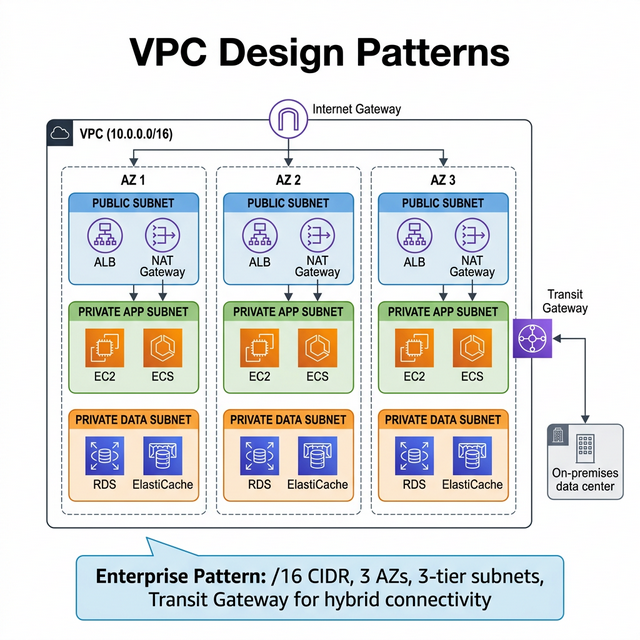
VPC Design Patterns

VPC Design Patterns Diagram

VPC design is the foundation of every AWS architecture. Get this wrong, and everything else fails:

VPC CIDR Planning (Interview Must-Know)

CIDR Block Total IPs Usable IPs Best For
/16 65,536 65,531 Large production VPC (recommended default)
/20 4,096 4,091 Medium workload, dev/staging
/24 256 251 Small subnet, single-purpose
/28 16 11 Smallest subnet allowed (AWS reserves 5 IPs per subnet)

AWS reserves 5 IPs per subnet: network address, VPC router (.1), DNS (.2), future use (.3), broadcast.

Enterprise VPC Architecture

Tier Subnet Type Contains Internet Access
Public Public subnet ALB, NAT Gateway, Bastion (if any) Direct via Internet Gateway
Private App Private subnet EC2, ECS, Lambda (VPC), EKS nodes Outbound only via NAT Gateway
Private Data Private subnet RDS, ElastiCache, OpenSearch No internet access (most secure)
Transit Private subnet Transit Gateway attachments, VPN Routes to on-premises

Multi-Account VPC Strategy (Enterprise)

  • Hub-and-Spoke β€” Central "shared services" VPC (DNS, logging, security) connected to workload VPCs via Transit Gateway. Each team gets isolated VPCs.
  • Non-overlapping CIDRs β€” Plan CIDR blocks upfront using IPAM (VPC IP Address Manager). Overlapping CIDRs = impossible to peer or route.
  • AWS Organizations + RAM β€” Share subnets across accounts using Resource Access Manager. One networking team manages VPCs, app teams deploy into shared subnets.

🎯 Key Takeaway

Interview tip: Say: "I design VPCs with a /16 CIDR, 3 tiers of subnets across 3 AZs (public, private-app, private-data), non-overlapping ranges planned with IPAM. For multi-account, I use Transit Gateway as a hub with spoke VPCs per workload, shared via RAM. This gives network isolation with centralized control."
Beginner

Subnets & Route Tables

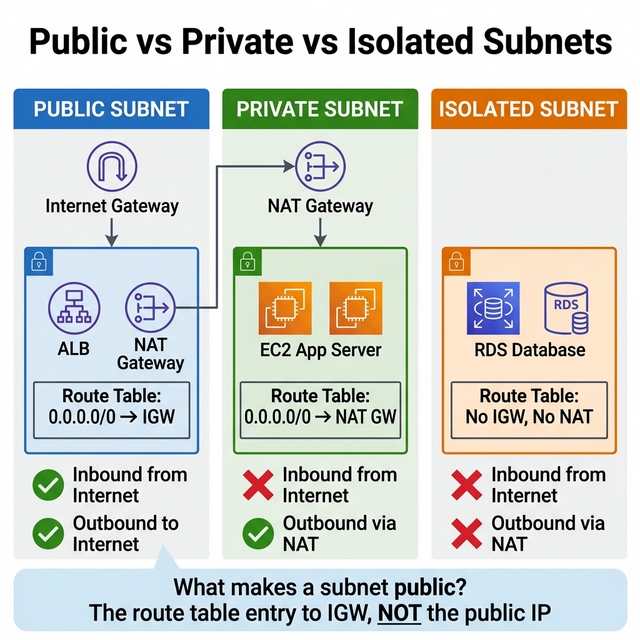
Public vs Private vs Isolated Subnets Diagram

Bad Answer

"A public subnet has a public IP and a private subnet doesn't."

Correct Answer

A subnet is public if its route table has a route to an Internet Gateway (IGW). A subnet is private if it does NOT have a route to an IGW. The presence of a public IP is separate β€” it enables the instance to communicate via the IGW, but without the IGW route, traffic goes nowhere.

Public vs Private vs Isolated Subnets

Subnet Type Route to IGW Outbound Internet Inbound from Internet Use Case
Public βœ… Yes (0.0.0.0/0 β†’ IGW) βœ… Yes βœ… Yes (if SG allows) ALB, NAT Gateway, bastion
Private ❌ No IGW route βœ… Via NAT Gateway ❌ No Application servers, containers
Isolated ❌ No IGW route ❌ No (no NAT) ❌ No Databases, sensitive data

NAT Gateway β€” Key Details

  • Cost: $0.045/hr + $0.045/GB processed (~$32/month just for running)
  • Deploy per AZ β€” For HA, place one NAT Gateway in each AZ's public subnet
  • Alternative: NAT instances (cheaper for dev, but you manage patching/HA)
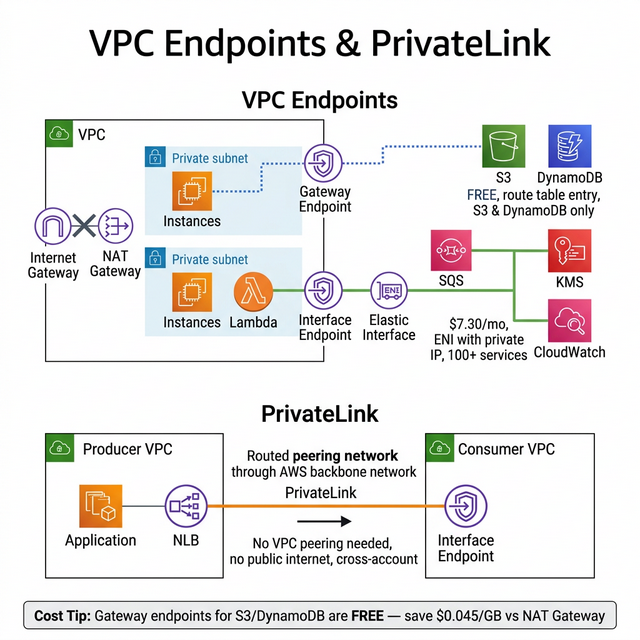
  • Cost savings: Use VPC endpoints for S3/DynamoDB to avoid NAT Gateway data processing charges

🎯 Key Takeaway

Interview tip: "What makes a subnet public is the route table entry to the IGW, not the IP. I always deploy NAT Gateways per AZ for HA, and use S3/DynamoDB gateway endpoints to reduce NAT costs β€” which can be the #1 surprise cost in AWS."

Intermediate

Security Groups vs NACLs

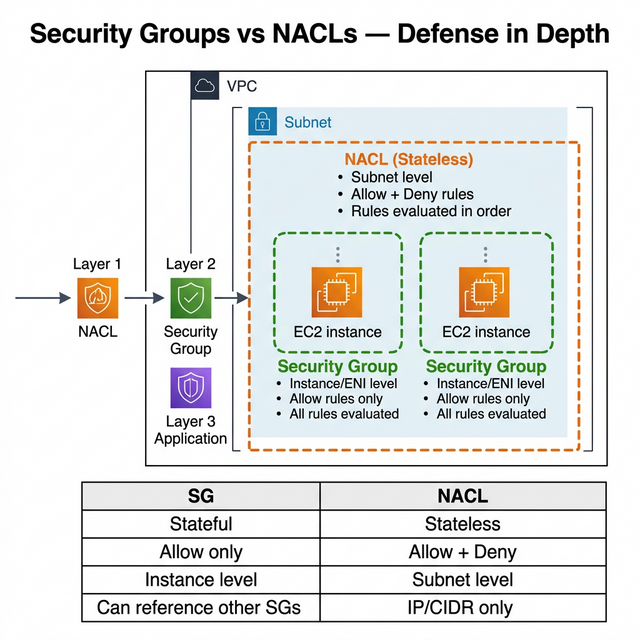
Security Groups vs NACLs Defense in Depth Diagram

This is asked in almost every SA interview β€” know this table cold:

Feature Security Group (SG) Network ACL (NACL)
Level Instance / ENI level Subnet level
State Stateful (return traffic auto-allowed) Stateless (must allow return traffic explicitly)
Rules Allow rules only Allow AND Deny rules
Evaluation All rules evaluated together Rules evaluated in order (lowest number first)
Default Deny all inbound, allow all outbound Allow all inbound and outbound
Reference SGs βœ… Can reference other SGs by ID ❌ IP/CIDR ranges only
Use Case Primary defense β€” control app-level access Subnet-wide deny rules, compliance requirements

Defense in Depth Pattern

  • Layer 1 β€” NACL: Block known bad IP ranges, deny specific ports at the subnet boundary
  • Layer 2 β€” SG: Allow only required ports from specific sources (other SGs, CIDRs)
  • Layer 3 β€” Application: Validate auth tokens, rate limiting in the app

SG Best Practice: Reference Other SGs

Instead of hardcoding IPs, reference security groups: "Allow inbound port 3306 from sg-webapp". This way, any instance in the webapp SG can reach the database β€” no IP management needed. This is a key architectural pattern interviewers look for.

🎯 Key Takeaway

Interview tip: "Security Groups are stateful and my primary defense β€” I reference other SGs to avoid IP management. NACLs are stateless and subnet-wide β€” I use them for deny rules and compliance. Together they provide defense in depth. The most common mistake is relying on NACLs instead of SGs."

Advanced

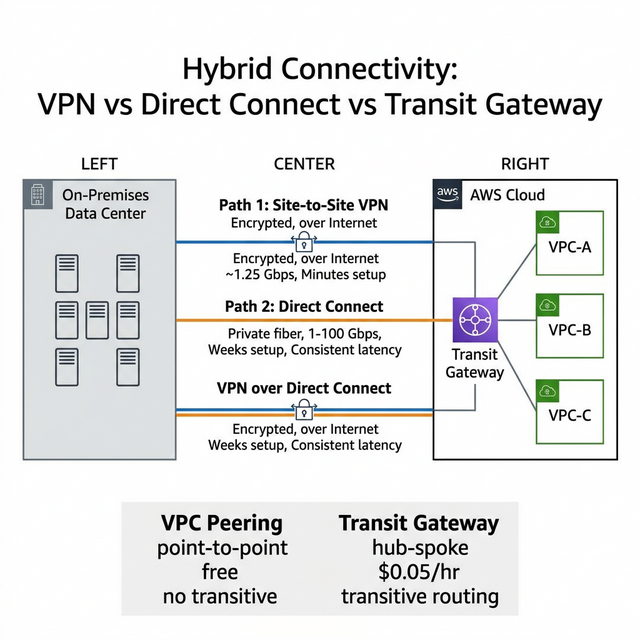
VPN vs Direct Connect vs Transit Gateway

Hybrid Connectivity VPN vs Direct Connect vs Transit Gateway Diagram

Hybrid connectivity is asked in every enterprise SA interview:

Feature Site-to-Site VPN Direct Connect (DX) Transit Gateway (TGW)
Connection Encrypted over public internet Dedicated private fiber Hub that connects VPCs, VPNs, DX
Bandwidth Up to 1.25 Gbps per tunnel 1 Gbps, 10 Gbps, or 100 Gbps Up to 50 Gbps per attachment
Latency Variable (internet-dependent) Consistent, low latency Adds ~1ms hop
Setup Time Minutes (software-defined) Weeks to months (physical fiber) Minutes (attach existing connections)
Redundancy 2 tunnels per connection Need 2 DX connections at different locations Built-in HA across AZs
Cost ~$36/month per connection $0.30/GB + port fee ($220-$14,400/mo) $0.05/hr + data processing
Encryption βœ… IPSec built-in ❌ Not encrypted (add VPN over DX for encryption) Supports VPN attachments

Decision Framework

  • Quick POC / backup β†’ Site-to-Site VPN (minutes to set up)
  • Production hybrid >1 Gbps β†’ Direct Connect with VPN backup
  • Multiple VPCs + on-prem β†’ Transit Gateway as hub (avoid VPC peering mesh)
  • Encryption required on DX β†’ VPN over Direct Connect (IPSec tunnel over private link)

VPC Peering vs Transit Gateway

Aspect VPC Peering Transit Gateway
Topology Point-to-point (1:1) Hub-and-spoke (1:many)
Transitive Routing ❌ Not supported βœ… Supported
Scale Max 125 peering connections 5,000 attachments
Cost Free (pay for data transfer) $0.05/hr per attachment + data
Use When 2-3 VPCs, simple setup >3 VPCs, on-prem, centralized routing

🎯 Key Takeaway

Interview tip: "For enterprise hybrid, I'd use Direct Connect for primary connectivity (consistent latency, high bandwidth) with Site-to-Site VPN as backup. Transit Gateway acts as the central hub connecting all VPCs, the DX, and VPN. For encryption over DX, I'd run a VPN tunnel over the Direct Connect connection."

Intermediate

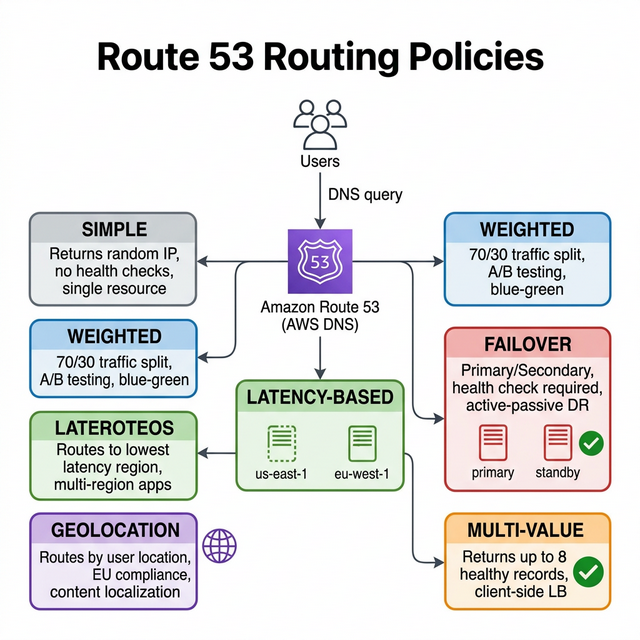
Route 53 Routing Policies

Route 53 Routing Policies Diagram

Route 53 routing policies β€” know when to use each one:

Policy How It Works Use Case Health Checks
Simple Returns one or more IPs randomly Single resource, no special routing needed ❌ No
Weighted Distributes traffic by percentage (e.g., 70/30) Blue/green deployment, A/B testing, gradual migration βœ… Optional
Latency-Based Routes to the region with lowest latency Multi-region apps β€” users get fastest response βœ… Yes
Failover Primary/secondary β€” switches on health check failure Active-passive DR, S3 static site as fallback βœ… Required
Geolocation Routes based on user's geographic location Content localization, regulatory compliance (EU data stays in EU) βœ… Optional
Geoproximity Routes based on distance + bias values Shift traffic between regions using bias βœ… Optional
Multi-Value Returns up to 8 healthy records randomly Client-side load balancing across multiple IPs βœ… Yes

Route 53 + Health Checks Architecture

Pattern: Failover routing with health checks β†’ Primary region (us-east-1) serves traffic. If health check fails, Route 53 switches to secondary region (us-west-2) automatically. Combine with latency-based routing for multi-region active-active.

🎯 Key Takeaway

Interview tip: "For multi-region, I'd combine latency-based routing (users get the nearest region) with failover (unhealthy regions are automatically bypassed). For compliance (e.g., EU data residency), geolocation routing ensures EU users always hit eu-west-1. For gradual migrations, weighted routing lets me shift 10% β†’ 50% β†’ 100% to the new stack."

Advanced

Interview Questions β€” Networking & VPC

Networking questions separate strong architects from the rest. These test real VPC design thinking.

  1. Answer Guide
    Use non-overlapping CIDRs (e.g., 10.0.0.0/16 prod, 10.1.0.0/16 staging, 10.2.0.0/16 dev). Consider Transit Gateway for hub-and-spoke vs full mesh peering. Plan for IP exhaustion.
  2. Answer Guide
    S3 Gateway Endpoint β€” free, no data processing charges. This is the #1 hidden cost savings in AWS networking. Also consider Interface Endpoints for DynamoDB and other services.
  3. Answer Guide
    NACLs are evaluated first (subnet level). If NACL denies, traffic never reaches the SG. NACLs are stateless (need inbound + outbound rules). SGs are stateful (return traffic auto-allowed).
  4. Answer Guide
    AWS Direct Connect with two connections at different DX locations for resilience. Add VPN as backup over the internet. Discuss BGP failover, LAG groups, and the 1-3 month provisioning time.
  5. Answer Guide
    Check route table (0.0.0.0/0 β†’ NAT GW?), NAT Gateway in public subnet with IGW route, Security Group outbound rules, NACL rules (both inbound and outbound β€” it's stateless), and DNS resolution (VPC DNS settings).
  6. Answer Guide
    Route 53 Resolver with Inbound Endpoints (on-prem β†’ AWS) and Outbound Endpoints (AWS β†’ on-prem). Resolver rules forward specific domains. Discuss conditional forwarding.
  7. Answer Guide
    Use AZ-aware routing (ALB with AZ affinity), deploy caches per AZ, consider same-AZ read replicas. Trade-off: reducing cross-AZ traffic can reduce availability if an AZ goes down.
  8. Answer Guide
    VPC Peering isn't transitive β€” 15 VPCs need n(n-1)/2 = 105 connections. Transit Gateway provides hub-and-spoke with transitive routing. Discuss cost trade-off: TGW charges per attachment + per GB.
  9. Answer Guide
    Gateway endpoints (S3, DynamoDB only) β€” free, route table entry. Interface endpoints (all other services) β€” ENI in subnet, cost per hour + per GB. Gateway is always preferred when available.
  10. Answer Guide
    Latency-based routing with health checks. When a health check fails, Route 53 removes that region. Discuss TTL implications, health check intervals (10s vs 30s), and fast failover vs DNS caching.

Preparation Strategy

Networking questions often start simple but go deep quickly. Practice drawing VPC diagrams on a whiteboard β€” subnets, route tables, gateways, and security boundaries. The ability to diagram while explaining shows confidence.