AWS

AWS Interview Guide

Core AWS services, Well-Architected Framework, migration, and solutions architecture topics.

7Topics
Beginner

AWS Services for Interviews

Key AWS services to know for solutions architect and cloud engineer interviews, organized by domain with one-liner descriptions:

Compute

  • EC2 β€” Virtual servers with full OS control; choose instance type for CPU/memory ratio
  • Auto Scaling β€” Automatically adjusts EC2 count based on demand (target tracking, step, scheduled)
  • Lambda β€” Run code without servers; 15-min max, 10GB memory, pay per invocation
  • EKS β€” Managed Kubernetes control plane; you manage worker nodes or use Fargate
  • ECS β€” AWS-native container orchestrator; simpler than K8s, tight AWS integration
  • Fargate β€” Serverless compute for ECS/EKS; no EC2 to manage, pay per vCPU+memory

Storage

  • S3 β€” Object storage; 11 9s durability, lifecycle policies, 6 storage classes
  • EBS β€” Block storage attached to EC2; gp3 (general), io2 (high IOPS), st1/sc1 (throughput)
  • EFS β€” Managed NFS; shared across AZs, auto-scales, good for containers
  • FSx β€” Managed file systems (Lustre for HPC, NetApp ONTAP for enterprise, Windows)

Database

  • RDS β€” Managed relational DB (MySQL, PostgreSQL, Oracle, SQL Server); Multi-AZ for HA
  • Aurora β€” Cloud-native relational; 5x MySQL perf, 6-way replication, Global Database
  • DynamoDB β€” Serverless NoSQL; single-digit ms latency, auto-scales, Global Tables
  • ElastiCache β€” In-memory caching (Redis or Memcached); sub-millisecond reads
  • Redshift β€” Petabyte-scale data warehouse; columnar storage, Spectrum for S3 queries

Networking

  • VPC β€” Isolated network; subnets, route tables, NACLs, security groups, NAT Gateway
  • ALB β€” Layer 7 load balancer; path/host routing, WebSocket, gRPC support
  • NLB β€” Layer 4 load balancer; ultra-low latency, static IPs, TCP/UDP
  • API Gateway β€” Managed REST/WebSocket APIs; throttling, caching, auth integration
  • CloudFront β€” Global CDN; 450+ edge locations, Lambda@Edge, Origin Shield
  • Route 53 β€” DNS + health checks; routing policies (weighted, latency, failover, geolocation)
  • Direct Connect β€” Dedicated private connection from on-prem to AWS; 1/10/100 Gbps

Security

  • IAM β€” Users, roles, policies; always use least privilege, prefer roles over keys
  • KMS β€” Managed encryption keys; integrates with S3, EBS, RDS, etc.
  • WAF β€” Web Application Firewall; rate limiting, IP blocking, SQL injection/XSS protection
  • Shield β€” DDoS protection; Standard (free) vs Advanced ($3k/mo, 24/7 DRT)
  • GuardDuty β€” Threat detection using ML; analyzes CloudTrail, VPC Flow, DNS logs
  • Secrets Manager β€” Rotate, manage, retrieve secrets; auto-rotation for RDS credentials
  • AWS Config β€” Tracks resource configuration changes; compliance rules, remediation
  • Security Hub β€” Centralized security findings from GuardDuty, Inspector, Macie, Config

Migration

  • DMS β€” Database Migration Service; supports homogeneous + heterogeneous migrations
  • MGN β€” Application Migration Service; continuous replication for lift-and-shift
  • Migration Hub β€” Central dashboard to track migration progress
  • Snow Family β€” Physical devices for offline data transfer (Snowcone, Snowball Edge). Note: Snowmobile has been discontinued.

Event Driven

  • SQS β€” Managed message queue; Standard (at-least-once) vs FIFO (exactly-once)
  • SNS β€” Pub/sub messaging; fan-out to SQS, Lambda, HTTP, email, SMS
  • EventBridge β€” Serverless event bus; content-based filtering, schema registry
  • Step Functions β€” Visual workflow orchestrator; Standard (long) vs Express (high-volume)

Observability

  • CloudWatch β€” Metrics, logs, alarms, dashboards; custom metrics, Log Insights queries
  • CloudTrail β€” API call audit log; who did what, when, from which IP
  • X-Ray β€” Distributed tracing; trace requests across microservices, find bottlenecks

Gen AI

  • Bedrock β€” Managed foundation models (Claude, Llama, Titan); RAG, fine-tuning, agents
  • SageMaker β€” Full ML platform; build, train, deploy custom models at scale
  • Amazon Q β€” AI assistant for business (Q Business) and developers (Q Developer)

Cost Optimization

  • Cost Explorer β€” Visualize and forecast AWS spending trends
  • Compute Optimizer β€” Right-sizing recommendations for EC2, Lambda, EBS
  • Savings Plans β€” Commit to $/hr for 1-3 yrs; up to 72% savings (flexible across services)
  • Reserved Instances β€” Commit to specific instance type; up to 75% savings
  • Spot Instances β€” Up to 90% savings; can be interrupted with 2-min warning

Analytics

  • Athena β€” Serverless SQL queries on S3; pay per query, great for ad-hoc analysis
  • Glue β€” Serverless ETL + Data Catalog; crawlers auto-discover schema
  • EMR β€” Managed Spark/Hadoop; big data processing at petabyte scale
  • Kinesis β€” Real-time data streaming; Data Streams, Firehose, Analytics
  • QuickSight β€” Serverless BI dashboards; ML-powered insights, pay per session
πŸ’‘
Key Takeaway for Interviews

Don't just list services β€” explain when and why you'd choose one over another. Example: "I'd use DynamoDB for single-digit ms reads on key-value data, but Aurora for complex joins and transactions." Interviewers want architectural reasoning, not memorization.
Beginner

Availability Zone & Data Center

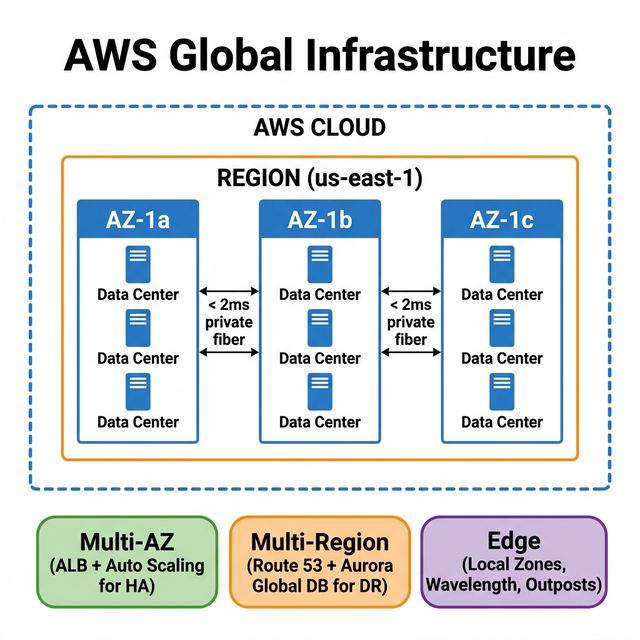
AWS Global Infrastructure β€” Regions, Availability Zones, and Data Centers
AWS Global Infrastructure hierarchy

How Many Data Centers in One Availability Zone?

Correct Answer

An AWS availability zone (AZ) can contain multiple data centers. Each zone is usually backed by one or more physical data centers, with the largest backed by as many as five.

Incorrect Answer

One Availability Zone means one data center.

Architect-Level Detail

Concept Details
Region Geographic area (e.g., us-east-1). Contains 2-6+ AZs. Choose based on latency, compliance, service availability.
Availability Zone One or more isolated data centers with independent power, cooling, networking. Connected to other AZs via low-latency (<2ms) private fiber.
Multi-AZ Deploy across 2+ AZs for HA. RDS Multi-AZ = synchronous standby. ELB distributes across AZs automatically.
Multi-Region Deploy across 2+ regions for DR and global latency. Requires data replication strategy (Aurora Global DB, DynamoDB Global Tables, S3 CRR).
Local Zones Extension of a region placed closer to users (e.g., Los Angeles). Run latency-sensitive workloads (gaming, media, ML inference).
Wavelength Zones AWS infrastructure embedded in 5G carrier networks. Ultra-low latency for mobile edge applications.
Outposts AWS hardware in your on-premises data center. Same APIs as cloud. For data residency or ultra-low latency.
πŸ’‘
Key Takeaway for Interviews

Always design for Multi-AZ minimum. When asked about HA: "I'd deploy across at least 2 AZs with ALB, Auto Scaling, and Multi-AZ RDS." For global apps: "I'd add multi-region with Route 53 failover and Aurora Global Database."

Intermediate

RPO vs RTO & DR Strategies

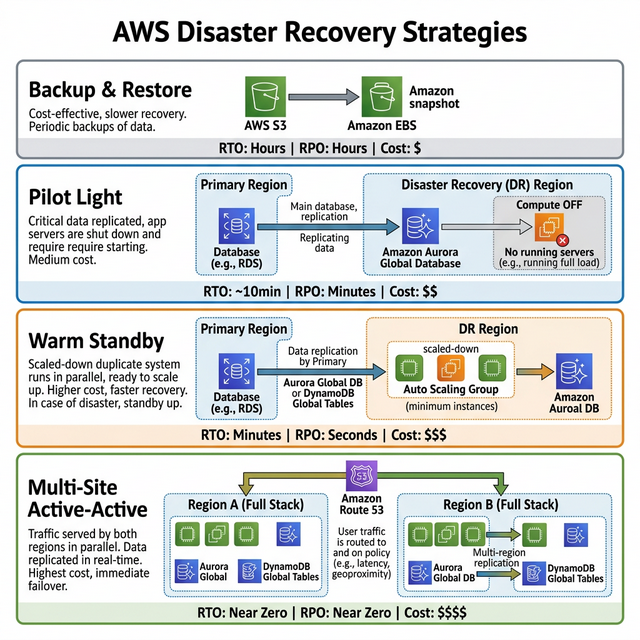
AWS Disaster Recovery Strategies β€” Backup & Restore, Pilot Light, Warm Standby, Active-Active
DR Strategies comparison β€” cost vs RTO/RPO

Definitions

  • RTO (Recovery Time Objective) β€” How quickly must the application be available after an outage? Measures maximum acceptable downtime.
  • RPO (Recovery Point Objective) β€” How much data loss is acceptable? Measures the maximum time between the last backup and the disaster. Both are measured in time, not data volume.

AWS DR Strategies (Lowest β†’ Highest Cost)

Strategy RTO RPO Cost How It Works
Backup & Restore Hours Hours πŸ’° Take periodic backups (S3, EBS snapshots). Restore infrastructure from scratch when disaster hits.
Pilot Light 10s of min Minutes πŸ’°πŸ’° Core database runs in DR region (replicated). Compute is OFF. On failover: start EC2/ECS, scale up, switch DNS.
Warm Standby Minutes Seconds πŸ’°πŸ’°πŸ’° Scaled-down but fully running copy of production in DR region. On failover: scale up and switch traffic.
Multi-Site Active-Active Near zero Near zero πŸ’°πŸ’°πŸ’°πŸ’° Full production in 2+ regions. Route 53 health checks auto-failover. DynamoDB Global Tables or Aurora Global DB for data.

Key AWS Services for DR

  • Route 53 β€” DNS failover (health checks, weighted/latency routing)
  • Aurora Global Database β€” Cross-region replication with <1 second lag, promote in <1 min
  • DynamoDB Global Tables β€” Active-active multi-region, eventually consistent
  • S3 Cross-Region Replication (CRR) β€” Automatic object replication to another region
  • AWS Backup β€” Centralized backup policies across EC2, RDS, EFS, DynamoDB
  • CloudFormation / Terraform β€” Infrastructure as Code to re-create environments quickly
πŸ’‘
Key Takeaway for Interviews

Interviewers always ask: "How would you design DR?" Start by asking about RTO/RPO requirements, then map to the appropriate strategy. Pilot Light is the most common answer for cost-effective DR. Say: "I'd keep Aurora Global DB replicating to us-west-2, with infrastructure defined in CloudFormation. On failure, I'd launch compute, scale up, and flip Route 53."

Intermediate

AWS Well-Architected Framework

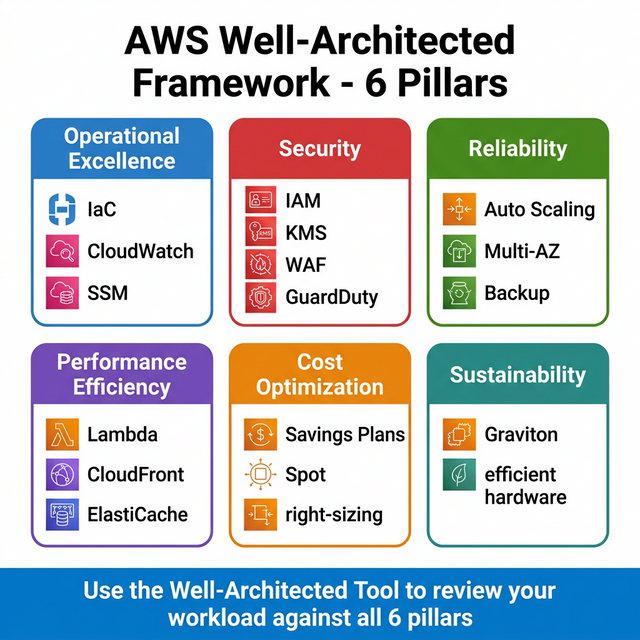
AWS Well-Architected Framework β€” 6 Pillars
The 6 pillars of the Well-Architected Framework

The Well-Architected Framework is AWS's blueprint for building production-grade systems. Built around 6 pillars:

Pillar Focus Key Practices Key AWS Services
Operational Excellence Run & monitor IaC, small reversible changes, anticipate failure, learn from events CloudFormation, CloudWatch, Systems Manager, Config
Security Protect Least privilege, traceability, security at all layers, encrypt everything IAM, KMS, GuardDuty, WAF, Shield, Security Hub
Reliability Recover Auto-recover, test recovery, scale horizontally, stop guessing capacity Auto Scaling, Multi-AZ, Route 53, Backup, CloudFormation
Performance Efficiency Use resources wisely Right-size, use managed services, go serverless, go global Lambda, CloudFront, ElastiCache, Aurora, Compute Optimizer
Cost Optimization Eliminate waste Consumption model, right-sizing, Savings Plans, spot instances Cost Explorer, Budgets, Spot, Savings Plans, S3 lifecycle
Sustainability Minimize impact Maximize utilization, efficient hardware (Graviton), reduce downstream impact Graviton instances, S3 Intelligent-Tiering, Compute Optimizer

Well-Architected Tool

AWS provides a Well-Architected Tool in the console that walks you through a review of your workload against all 6 pillars. It generates a report with risks and improvement recommendations. Use it before every major production launch.

πŸ’‘
Key Takeaway for Interviews

When asked "How do you ensure your architecture is production-ready?", reference the Well-Architected Framework. The interviewer is looking for you to think across all pillars β€” not just reliability and performance but also cost, security, and operations. Mention specific practices: "I'd use IaC for repeatability, Multi-AZ for reliability, IAM least privilege for security, and Savings Plans for cost."

Intermediate

AWS Migration β€” The 7 Rs

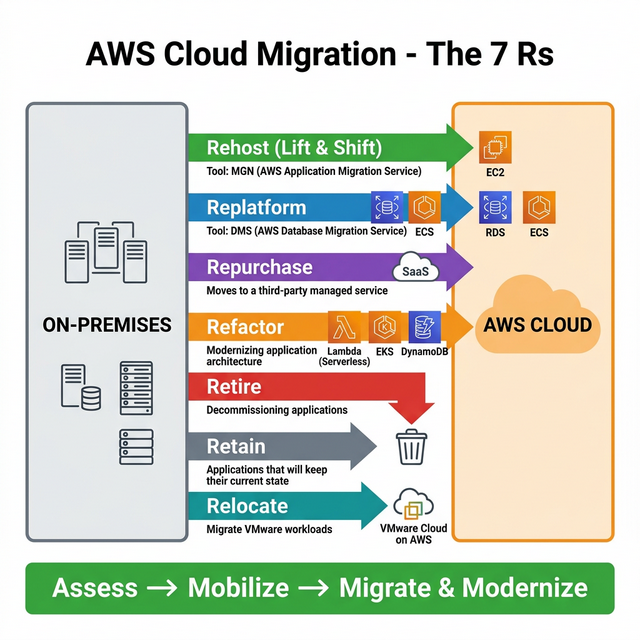
AWS Cloud Migration β€” The 7 Rs
The 7 Rs of Cloud Migration
Strategy What It Means When to Use AWS Tool
Rehost (Lift & Shift) Move as-is, no code changes Quick migration, minimal risk, meeting a deadline MGN (Application Migration Service)
Replatform (Lift, Tinker & Shift) Minor optimizations, no re-architecture Move to managed DB (RDS) or containers (ECS) DMS, Elastic Beanstalk
Repurchase Move to SaaS Replace CRM with Salesforce, email with SES AWS Marketplace
Refactor (Re-architect) Redesign using cloud-native services Need for scalability, microservices, serverless Lambda, API Gateway, DynamoDB, EKS
Retire Decommission App no longer needed; reduce portfolio Application Discovery Service
Retain Keep in source (for now) Complex dependencies, not ready, compliance N/A
Relocate Move infra without new hardware VMware workloads on AWS VMware Cloud on AWS

Migration Process (3 Phases)

  1. Assess β€” Use Application Discovery Service to inventory on-prem servers, dependencies, and utilization. Build a business case with Migration Evaluator.
  2. Mobilize β€” Set up landing zone (AWS Control Tower), establish networking (Direct Connect/VPN), create migration playbooks, train teams.
  3. Migrate & Modernize β€” Execute migrations wave-by-wave. Use MGN for servers, DMS for databases, Snow Family for large datasets. Then optimize (right-size, adopt managed services).
πŸ’‘
Key Takeaway for Interviews

When asked about migration strategy, start with: "I'd first run Application Discovery to understand the portfolio, then categorize each app using the 7 Rs." Most enterprise migrations start with Rehost for speed, then Replatform/Refactor post-migration. Always mention Direct Connect for network and DMS with CDC for near-zero-downtime database migration.

Advanced

API Gateway Authentication & Authorization

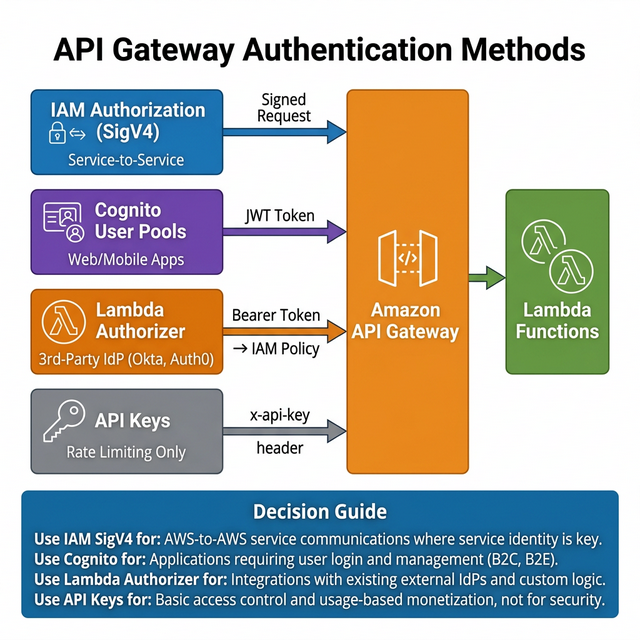
API Gateway Authentication Methods β€” IAM, Cognito, Lambda Authorizer, API Keys
API Gateway authentication and authorization flows
Method Best For How It Works Token Type Caching
IAM Authorization AWS-to-AWS, service-to-service Caller signs request with SigV4. API GW validates with IAM. AWS Signature N/A
Cognito User Pools Web/mobile apps, external users User authenticates with Cognito, gets JWT. API GW validates JWT directly. JWT (ID/Access) Built-in
Lambda Authorizer Custom auth, 3rd-party OAuth/OIDC Lambda receives token/params, returns IAM policy. Most flexible option. Bearer / Custom Up to 1hr
API Keys Rate limiting, client tracking Key sent in x-api-key header. Not true auth β€” use with another method. API Key string N/A

Decision Framework

  • Internal AWS services calling your API? β†’ IAM Authorization (SigV4)
  • End-users (web/mobile) with sign-up/sign-in? β†’ Cognito User Pools + Cognito Identity Pools for AWS resource access
  • Already using Okta/Auth0/Azure AD? β†’ Lambda Authorizer to validate their tokens
  • Need to track/throttle API consumers? β†’ API Keys + Usage Plans (always combine with real auth)
  • Need fine-grained per-resource permissions? β†’ Lambda Authorizer returning scoped IAM policy

REST API vs HTTP API

HTTP API (newer) supports JWT authorizers natively and is 70% cheaper, but doesn't support IAM auth, API keys, or Lambda token authorizers. REST API supports all 4 methods. Choose HTTP API for simple JWT-based auth; REST API for full control.

πŸ’‘
Key Takeaway for Interviews

This is a very common interview question. Know the 4 methods cold and when to use each. The winning answer: "For a public-facing mobile app I'd use Cognito with JWT validation. For internal microservice-to-microservice calls I'd use IAM SigV4. For integrating with an existing enterprise IdP like Okta, I'd use a Lambda Authorizer."

Intermediate

Serverless Web Application Architecture

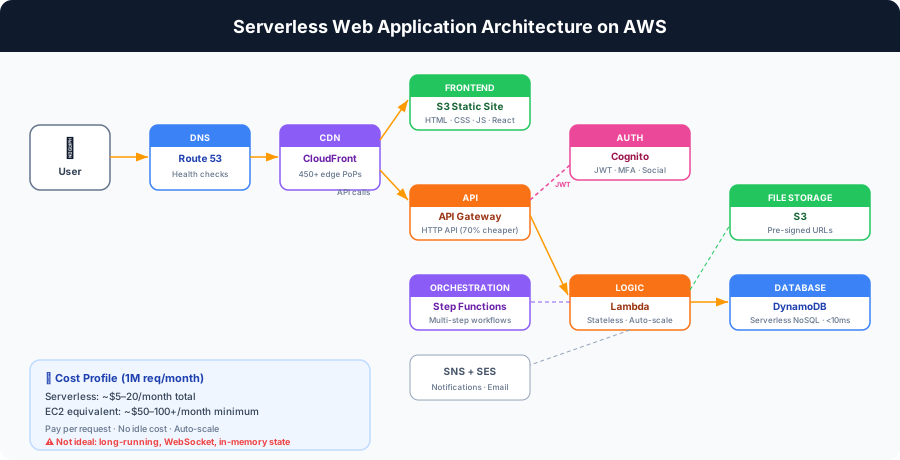
Serverless Web Application Architecture β€” Route 53, CloudFront, S3, API Gateway, Lambda, DynamoDB
Serverless web application architecture on AWS

Full Architecture (Layer by Layer)

Layer Service Why This Service
DNS Route 53 Custom domain, health checks, SSL cert via ACM
CDN CloudFront Global edge caching, HTTPS termination, Origin Access Control for S3
Frontend Hosting S3 (static website) HTML/CSS/JS/React build. No servers. Costs pennies. 11 9s durability.
Auth Cognito User Pools Sign-up, sign-in, MFA, social login. Issues JWT tokens.
API API Gateway (HTTP API) RESTful endpoints, JWT auth, throttling. 70% cheaper than REST API.
Business Logic Lambda Stateless functions. Auto-scales to 1000+ concurrent. Pay per invocation.
Orchestration Step Functions For multi-step workflows (order processing, onboarding flows).
Database DynamoDB Serverless NoSQL. Single-digit ms. On-demand or provisioned capacity.
File Storage S3 User uploads, media files. Pre-signed URLs for secure direct uploads.
Notifications SNS + SES Push notifications, email confirmations, alerts.

When NOT to Use Serverless

  • Long-running processes β€” Lambda has 15-min limit. Use ECS/Fargate or Step Functions instead.
  • Consistent high traffic β€” At sustained high volume, EC2/ECS with reserved instances may be cheaper than Lambda.
  • WebSocket-heavy apps β€” API Gateway WebSocket API works but can be expensive at scale. Consider AppSync or a container-based solution.
  • Complex state management β€” Lambda is stateless. If you need in-memory state, use ElastiCache or containers.

Cost Profile

A serverless web app serving 1M requests/month typically costs $5-20/month total (S3 + CloudFront + API Gateway + Lambda + DynamoDB on-demand). The same on EC2 would cost $50-100+/month minimum.

πŸ’‘
Key Takeaway for Interviews

This is the #1 whiteboard architecture question. Draw it layer by layer: Route 53 β†’ CloudFront β†’ S3 (frontend) β†’ API Gateway β†’ Lambda β†’ DynamoDB. Add Cognito for auth. The key differentiator is knowing when serverless is NOT the right choice β€” that shows real architect maturity.

Advanced

Interview Questions β€” AWS Core

Practice these questions to validate your understanding of AWS core concepts. Each question targets what interviewers actually ask at the Solutions Architect level.

  1. Answer Guide
    Discuss assessment criteria β€” business criticality, technical debt, dependencies, licensing. Explain why you wouldn't apply the same R to every service.
  2. Answer Guide
    Startups often prioritize Cost Optimization + Operational Excellence. Enterprises lean toward Security + Reliability. Justify your reasoning.
  3. Answer Guide
    HTTP API has lower latency and is 70% cheaper but lacks some features. Consider Lambda authorizers vs Cognito vs IAM depending on the client type.
  4. Answer Guide
    This requires multi-site active-active or warm standby. Discuss Route 53 health checks, Aurora Global Database, S3 CRR, and DynamoDB Global Tables.
  5. Answer Guide
    API keys are not a security mechanism β€” they're for throttling. Discuss private API Gateway + VPC endpoint, or mutual TLS, or OAuth 2.0 with Cognito.
  6. Answer Guide
    One AZ = multiple data centers. Two AZs is good for most workloads, but consider regional failures, compliance requirements, and data sovereignty.
  7. Answer Guide
    Check Lambda duration/memory over-provisioning, DynamoDB capacity mode (on-demand vs provisioned), CloudFront cache hit ratio, and API Gateway request volume.
  8. Answer Guide
    Since Feb 2024, ALL public IPv4 addresses cost $0.005/hr whether attached or not. 50 EIPs = ~$180/month wasted. Use AWS Config rules and SCPs.
  9. Answer Guide
    Lambda authorizer responses are cached (TTL up to 3600s by default). If a user's permissions change, stale cached policies cause 403s. Adjust cache TTL or invalidate.
  10. Answer Guide
    Use KMS with customer-managed CMKs for at-rest encryption. Discuss envelope encryption, key rotation policies, cross-account key sharing, and TLS 1.2+ for in-transit.

Preparation Strategy

Don't just memorize answers β€” practice explaining your decision-making process. Interviewers want to hear trade-offs, constraints you considered, and why you chose one approach over alternatives. Use the format: "I'd evaluate X vs Y based on [criteria]. Given [constraints], I'd choose Y because [reason]."